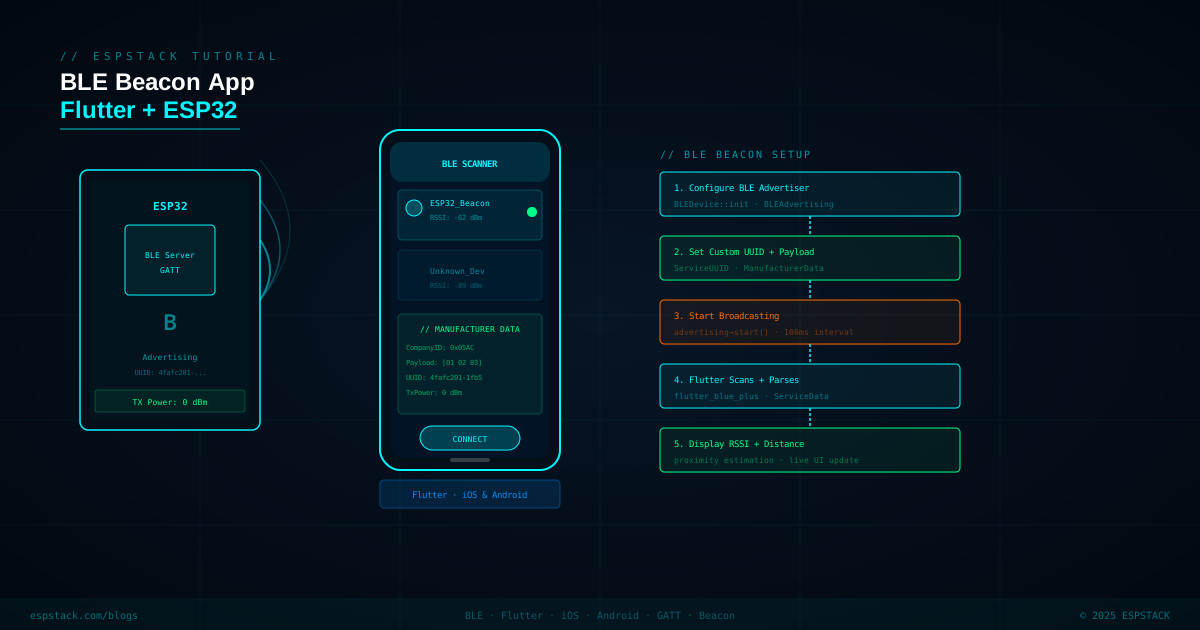
BLE beacons are the backbone of proximity marketing, asset tracking, indoor navigation, and countless IoT scenarios. The ESP32's built-in Bluetooth 4.2 radio makes it a perfect low-cost beacon transmitter. In this tutorial you'll configure the ESP32 to broadcast a custom 128-bit service UUID plus manufacturer-specific data bytes — then build a Flutter app for iOS and Android that scans for the beacon, parses the UUID and payload, displays RSSI, and calculates estimated distance. No connection needed — everything is carried in the advertisement packet itself.
Prerequisites
| Requirement | Version / Notes |
|---|---|
| ESP32 DevKit | Any variant; Arduino IDE 2.x + ESP32 by Espressif boards package |
| Arduino ESP32 BLE library | Bundled with Espressif board package — no extra install needed |
| Flutter SDK | 3.x (stable channel) |
| flutter_blue_plus | ^1.31.0 — add to pubspec.yaml |
| iOS permissions | Add NSBluetoothAlwaysUsageDescription to Info.plist |
| Android permissions | BLUETOOTH_SCAN + BLUETOOTH_CONNECT in AndroidManifest.xml (API 31+) |
Step 1 — Configure the ESP32 BLE Beacon
The ESP32 BLE stack is event-driven. For a beacon you only need to configure the advertising data — no GATT server required. The key trick is embedding both a 128-bit service UUID and manufacturer-specific data (company ID + custom payload) in the same advertisement packet. The total advertisement payload is 31 bytes, so keep your data lean.
#include <BLEDevice.h>
#include <BLEAdvertising.h>
#include <BLEAdvertisementData.h>

// Custom 128-bit Service UUID — generate yours at https://www.uuidgenerator.net/
#define BEACON_UUID "12345678-1234-1234-1234-123456789abc"

// Company ID (little-endian): 0xFFFF = test/unknown company
// Payload: 8 bytes of application data (e.g. beacon ID + sensor reading)
const uint8_t COMPANY_ID[2]  = { 0xFF, 0xFF };
const uint8_t PAYLOAD[8]     = { 0x01, 0x02, 0xAA, 0xBB, 0x00, 0x01, 0x64, 0x00 };

BLEAdvertising *pAdvert;

void buildAdvertisementData(BLEAdvertisementData &advData,
                             BLEAdvertisementData &scanData) {
  // Flags: LE General Discoverable, BR/EDR not supported
  advData.setFlags(ESP_BLE_ADV_FLAG_GEN_DISC | ESP_BLE_ADV_FLAG_BREDR_NOT_SPT);

  // Add 128-bit complete service UUID
  advData.setCompleteServices(BLEUUID(BEACON_UUID));

  // Manufacturer-specific data: 2-byte company ID + payload
  std::string mfr;
  mfr += (char)COMPANY_ID[0];
  mfr += (char)COMPANY_ID[1];
  for (int i = 0; i < 8; i++) mfr += (char)PAYLOAD[i];
  advData.setManufacturerData(mfr);

  // Scan response carries the device name
  scanData.setName("ESPSTACK-BCN");
}

void setup() {
  Serial.begin(115200);
  BLEDevice::init("ESPSTACK-BCN");
  BLEDevice::setMTU(23);

  pAdvert = BLEDevice::getAdvertising();

  BLEAdvertisementData advData, scanData;
  buildAdvertisementData(advData, scanData);
  pAdvert->setAdvertisementData(advData);
  pAdvert->setScanResponseData(scanData);

  // TX Power: ESP_PWR_LVL_P9 = +9 dBm (max), N12 = -12 dBm (min)
  BLEDevice::setPower(ESP_PWR_LVL_P9);

  // Advertising interval: 100 ms (160 × 0.625 ms units)
  pAdvert->setMinInterval(160);
  pAdvert->setMaxInterval(160);

  pAdvert->start();
  Serial.println("Beacon advertising started");
}

void loop() {
  // Nothing to do — advertising runs in the BLE stack background task
  delay(1000);
  Serial.printf("Beacon TX power: +9 dBm, interval: 100ms\n");
}
Step 2 — Flutter: Setup and Permissions
Add flutter_blue_plus to pubspec.yaml, then configure platform permissions.
# pubspec.yaml
dependencies:
  flutter:
    sdk: flutter
  flutter_blue_plus: ^1.31.0
<!-- AndroidManifest.xml (inside <manifest>) -->
<uses-permission android:name="android.permission.BLUETOOTH_SCAN"
android:usesPermissionFlags="neverForLocation"/>
<uses-permission android:name="android.permission.BLUETOOTH_CONNECT"/>
<uses-permission android:name="android.permission.ACCESS_FINE_LOCATION"/><!-- ios/Runner/Info.plist -->
<key>NSBluetoothAlwaysUsageDescription</key>
<string>Required to scan for ESPSTACK BLE beacons.</string>Step 3 — Flutter: Scanning and Parsing Advertisement Data
// lib/beacon_scanner.dart
import 'dart:async';
import 'package:flutter/material.dart';
import 'package:flutter_blue_plus/flutter_blue_plus.dart';

const String TARGET_UUID = "12345678-1234-1234-1234-123456789abc";
const int COMPANY_ID = 0xFFFF;

class BeaconScanner extends StatefulWidget {
  const BeaconScanner({super.key});
  @override
  State<BeaconScanner> createState() => _BeaconScannerState();
}

class _BeaconScannerState extends State<BeaconScanner> {
  List<_BeaconInfo> beacons = [];
  StreamSubscription? _scanSub;

  @override
  void initState() {
    super.initState();
    _startScan();
  }

  void _startScan() {
    FlutterBluePlus.startScan(
      timeout: const Duration(seconds: 30),
      continuousUpdates: true,
    );

    _scanSub = FlutterBluePlus.onScanResults.listen((results) {
      final found = <_BeaconInfo>[];
      for (final r in results) {
        final uuids = r.advertisementData.serviceUuids
            .map((u) => u.toString().toLowerCase())
            .toList();
        if (!uuids.contains(TARGET_UUID.toLowerCase())) continue;

        final mfrData = r.advertisementData.manufacturerData;
        List<int> payload = [];
        if (mfrData.containsKey(COMPANY_ID)) {
          payload = mfrData[COMPANY_ID]!;
        }

        found.add(_BeaconInfo(
          name: r.device.advName.isNotEmpty ? r.device.advName : r.device.remoteId.str,
          rssi: r.rssi,
          distance: _estimateDistance(r.rssi),
          payload: payload,
        ));
      }
      setState(() => beacons = found);
    });
  }

  // Log-distance path loss: d = 10^((txPower - rssi) / (10 * n))
  // txPower at 1 m ≈ -59 dBm (calibrate for your hardware), n = 2.0 (free space)
  double _estimateDistance(int rssi) {
    const int txPower = -59;
    const double n = 2.0;
    if (rssi == 0) return -1;
    return Math.pow(10, (txPower - rssi) / (10 * n)).toDouble();
  }

  @override
  void dispose() {
    _scanSub?.cancel();
    FlutterBluePlus.stopScan();
    super.dispose();
  }

  @override
  Widget build(BuildContext context) {
    return Scaffold(
      backgroundColor: const Color(0xFF0A0E1A),
      appBar: AppBar(
        backgroundColor: const Color(0xFF0A0E1A),
        title: const Text('BLE Beacon Scanner',
            style: TextStyle(color: Color(0xFF00F5FF))),
      ),
      body: beacons.isEmpty
          ? const Center(child: CircularProgressIndicator(color: Color(0xFF00F5FF)))
          : ListView.builder(
              itemCount: beacons.length,
              itemBuilder: (_, i) {
                final b = beacons[i];
                return Card(
                  color: const Color(0xFF141928),
                  margin: const EdgeInsets.symmetric(horizontal: 16, vertical: 8),
                  child: Padding(
                    padding: const EdgeInsets.all(16),
                    child: Column(
                      crossAxisAlignment: CrossAxisAlignment.start,
                      children: [
                        Text(b.name, style: const TextStyle(
                            color: Color(0xFF00F5FF), fontSize: 16,
                            fontWeight: FontWeight.bold)),
                        const SizedBox(height: 8),
                        Text('RSSI: ${b.rssi} dBm',
                            style: const TextStyle(color: Colors.white70)),
                        Text('Distance: ~${b.distance.toStringAsFixed(2)} m',
                            style: const TextStyle(color: Colors.white70)),
                        Text('Payload: ${b.payload.map((v) => v.toRadixString(16).padLeft(2,'0')).join(' ')}',
                            style: const TextStyle(color: Colors.white54, fontSize: 12)),
                        const SizedBox(height: 8),
                        LinearProgressIndicator(
                          value: ((b.rssi + 100) / 70).clamp(0.0, 1.0),
                          color: const Color(0xFF00F5FF),
                          backgroundColor: Colors.white12,
                        ),
                      ],
                    ),
                  ),
                );
              },
            ),
    );
  }
}

class _BeaconInfo {
  final String name;
  final int rssi;
  final double distance;
  final List<int> payload;
  const _BeaconInfo({required this.name, required this.rssi,
      required this.distance, required this.payload});
}

// Add to imports at top of file:
// import 'dart:math' as Math;
Step 4 — Parsing the Custom Payload Bytes
The 8-byte payload in this demo encodes a beacon ID (2 bytes), a temperature reading (2 bytes, little-endian, in tenths of a degree), a battery level (1 byte, 0–100), and 3 reserved bytes. Parse them as follows in the Flutter app:
// Payload parser utility
class BeaconPayload {
  final int beaconId;
  final double temperature; // °C
  final int battery;        // percent

  BeaconPayload({required this.beaconId,
                 required this.temperature,
                 required this.battery});

  factory BeaconPayload.fromBytes(List<int> b) {
    if (b.length < 6) return BeaconPayload(beaconId: 0, temperature: 0, battery: 0);
    final id   = b[0] | (b[1] << 8);
    final raw  = b[2] | (b[3] << 8);
    final temp = raw / 10.0;
    final bat  = b[4];
    return BeaconPayload(beaconId: id, temperature: temp, battery: bat);
  }
}

// On the ESP32 side, encode temperature and battery into PAYLOAD:
// float tempC = 25.3; uint16_t rawTemp = (uint16_t)(tempC * 10);
// PAYLOAD[2] = rawTemp & 0xFF; PAYLOAD[3] = (rawTemp >> 8) & 0xFF;
// PAYLOAD[4] = batteryPercent;
Step 5 — Dynamic Payload Updates on the ESP32
Beacons become useful when their payload reflects live sensor data. Restart advertising with updated data every 5 seconds without any connection:
#include <BLEDevice.h>
#include <BLEAdvertising.h>

extern BLEAdvertising *pAdvert;

void updateBeaconPayload(float tempC, uint8_t battPct) {
  uint16_t rawTemp = (uint16_t)(tempC * 10);
  uint8_t payload[8] = {
    0x01, 0x00,                          // beacon ID = 1
    (uint8_t)(rawTemp & 0xFF),
    (uint8_t)((rawTemp >> 8) & 0xFF),
    battPct,
    0x00, 0x00, 0x00
  };

  BLEAdvertisementData advData, scanData;
  advData.setFlags(ESP_BLE_ADV_FLAG_GEN_DISC | ESP_BLE_ADV_FLAG_BREDR_NOT_SPT);
  advData.setCompleteServices(BLEUUID("12345678-1234-1234-1234-123456789abc"));
  std::string mfr;
  mfr += (char)0xFF; mfr += (char)0xFF;
  for (int i = 0; i < 8; i++) mfr += (char)payload[i];
  advData.setManufacturerData(mfr);
  scanData.setName("ESPSTACK-BCN");

  pAdvert->stop();
  pAdvert->setAdvertisementData(advData);
  pAdvert->setScanResponseData(scanData);
  pAdvert->start();
}

void loop() {
  float temp = readTemperatureSensor(); // your sensor function
  uint8_t batt = readBatteryPercent();
  updateBeaconPayload(temp, batt);
  delay(5000);
}Troubleshooting
| Symptom | Likely Cause | Fix |
|---|---|---|
| Flutter app never finds the beacon | UUID format mismatch (upper/lowercase) | Compare with .toLowerCase() on both sides; flutter_blue_plus returns lowercase |
| Manufacturer data map is empty | Advertisement packet too large (>31 bytes) | Shorten device name in scan response or reduce UUID length |
| RSSI jumps wildly | Multipath fading / reflections | Apply a moving average over the last 5 RSSI samples before displaying |
| iOS doesn't show beacon in background | iOS pauses BLE scanning when app is backgrounded | Use Core Bluetooth region monitoring for iBeacon format for background scanning |
| ESP32 restarts every few seconds | BLE task stack overflow | Increase BLE task stack via BLEDevice::init("", 4096) — second param is stack size |
Next Steps
- Implement the iBeacon format (Major/Minor + proximity UUID) for iOS background region monitoring.
- Add deep sleep between advertising bursts to extend battery life to months on a CR2032 coin cell.
- Build a fleet management dashboard in Flutter that tracks multiple beacons simultaneously on a floor plan image.
- Encode GPS coordinates in the manufacturer payload for outdoor asset tracking without a network connection.
- Use BLE 5 extended advertising for longer payloads and higher TX power on ESP32-C3 or ESP32-S3.