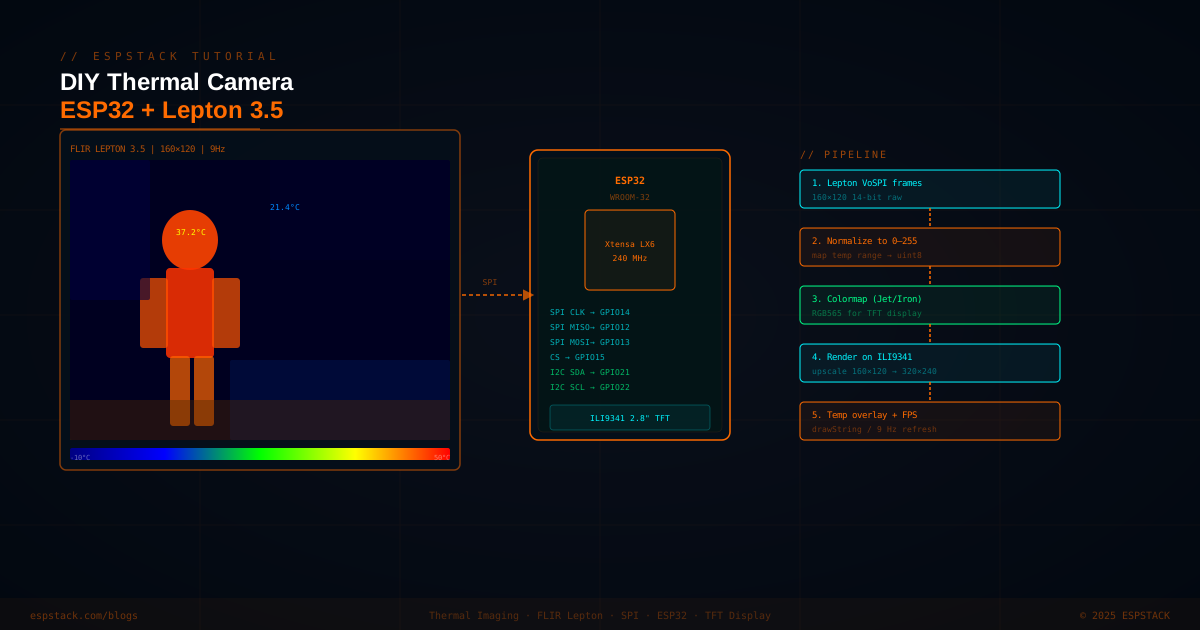
The FLIR Lepton 3.5 is one of the most capable thermal sensor modules available to hobbyists — 160×120 pixels of radiometric thermal data, radiometric output, and a fully-documented SPI interface. Paired with an ESP32 and a cheap ILI9341 320×240 TFT, you can build a hand-held thermal camera for under $150 that rivals commercial units costing ten times as much. In this tutorial you'll wire everything up, read raw VoSPI frames from the Lepton, normalize the 14-bit radiometric data, apply an iron colormap, and render an upscaled image on the TFT in real time — complete with a live temperature overlay and FPS counter.
Prerequisites
| Component | Quantity | Notes |
|---|---|---|
| ESP32 DevKit (38-pin) | 1 | Any variant with at least 2 SPI buses |
| FLIR Lepton 3.5 module | 1 | Radiometric version (part # 500-0771-01) |
| PureThermal Lepton breakout board | 1 | GroupGets PureThermal Mini or equivalent 3.3 V breakout |
| ILI9341 320×240 TFT (SPI) | 1 | 2.8″ or 3.2″ — any driver board exposing SPI pins |
| Breadboard + jumper wires | — | — |
| 3.3 V LDO or regulated power | 1 | Lepton draws up to 150 mA peak |
Software requirements: Arduino IDE 2.x with ESP32 by Espressif board package installed. Libraries: Lepton3 (or LeptonFLiR) by Bryan Costanich, TFT_eSPI by Bodmer. Both available in the Arduino Library Manager.
Step 1 — Wiring the Lepton Breakout and TFT
The Lepton uses two buses: VoSPI (SPI for image data) and CCI (I2C for configuration). The ILI9341 uses a second SPI bus. Assign them to separate ESP32 hardware SPI peripherals to avoid bus contention.
| Signal | Lepton Breakout Pin | ESP32 GPIO |
|---|---|---|
| VoSPI SCLK | CLK | GPIO 18 (VSPI CLK) |
| VoSPI MISO | MISO | GPIO 19 (VSPI MISO) |
| VoSPI CS | CS | GPIO 5 (VSPI CS) |
| CCI SDA | SDA | GPIO 21 (I2C SDA) |
| CCI SCL | SCL | GPIO 22 (I2C SCL) |
| VCC | 3V3 | 3.3 V rail |
| GND | GND | GND |
| Signal | ILI9341 Pin | ESP32 GPIO |
|---|---|---|
| TFT SCLK | SCK | GPIO 14 (HSPI CLK) |
| TFT MOSI | MOSI / SDA | GPIO 13 (HSPI MOSI) |
| TFT CS | CS | GPIO 15 (HSPI CS) |
| TFT DC | DC / RS | GPIO 2 |
| TFT RST | RESET | GPIO 4 |
| TFT BL | LED | 3.3 V (always on) |
Step 2 — Configure TFT_eSPI for HSPI
Edit User_Setup.h inside the TFT_eSPI library folder to match the HSPI pins above:
// User_Setup.h — TFT_eSPI
#define ILI9341_DRIVER
#define TFT_MOSI 13
#define TFT_SCLK 14
#define TFT_CS   15
#define TFT_DC    2
#define TFT_RST   4
#define SPI_FREQUENCY  40000000
#define SPI_READ_FREQUENCY  20000000
Step 3 — Reading VoSPI Frames from the Lepton
The Lepton outputs data over SPI as a sequence of video packets (rows). Each packet is 164 bytes: 2-byte ID, 2-byte CRC, 160 bytes of pixel data (80 pixels × 2 bytes for the 3.5's 160-px width in Lepton 3 mode). A complete frame consists of 60 packets (rows) — giving 160×120 pixels. The Lepton signals the start of a valid packet with ID bits [15:12] != 0xF; discard packets where those bits are 0xF (discard lines).
#include <SPI.h>
#include <TFT_eSPI.h>
#include <Wire.h>

#define LEP_CS    5
#define LEP_CLK   18
#define LEP_MISO  19
#define FRAME_COLS 80   // Lepton 3.5 in Lepton-3 mode: 2 segments × 80 cols
#define FRAME_ROWS 60

SPIClass lepSPI(VSPI);
TFT_eSPI tft = TFT_eSPI();

uint16_t frameBuffer[FRAME_ROWS * FRAME_COLS * 2]; // two segments
uint8_t  packet[164];

bool readSegment(uint16_t *buf, uint8_t segTarget) {
  uint32_t t0 = millis();
  int row = 0;
  while (row < FRAME_ROWS) {
    if (millis() - t0 > 200) return false; // timeout
    lepSPI.beginTransaction(SPISettings(20000000, MSBFIRST, SPI_MODE3));
    digitalWrite(LEP_CS, LOW);
    lepSPI.transfer(packet, 164);
    digitalWrite(LEP_CS, HIGH);
    lepSPI.endTransaction();

    uint8_t  id_h  = packet[0];
    uint8_t  id_l  = packet[1];
    uint16_t pktId = ((id_h & 0x0F) << 8) | id_l;
    uint8_t  seg   = (id_h >> 4) & 0x07;

    if ((id_h & 0xF0) == 0xF0) continue; // discard line
    if (pktId != row)           { row = 0; continue; }
    if (seg != segTarget && row == 20) { row = 0; continue; }

    for (int c = 0; c < FRAME_COLS; c++) {
      buf[row * FRAME_COLS + c] =
        ((uint16_t)packet[4 + c*2] << 8) | packet[5 + c*2];
    }
    row++;
  }
  return true;
}

bool captureFrame(uint16_t *frame) {
  // Lepton 3.5 outputs 4 segments per frame at full resolution
  // For 160×120 combine segments 1&2 (top) and 3&4 (bottom)
  for (uint8_t seg = 1; seg <= 4; seg++) {
    uint16_t *ptr = frame + (seg - 1) * FRAME_ROWS * FRAME_COLS;
    if (!readSegment(ptr, seg)) return false;
  }
  return true;
}
Step 4 — Normalize 14-bit Raw to 8-bit and Apply Iron Colormap
The Lepton 3.5 in radiometric mode outputs 14-bit values (0–16383) representing centi-Kelvin. Find the min and max across the frame, then linearly map each pixel to 0–255. Apply the classic iron palette (blue→black→red→orange→yellow→white) which is precomputed as a 256-entry RGB565 lookup table.
// Iron colormap as RGB565 — 256 entries (abbreviated, full table in repo)
const uint16_t ironMap[256] PROGMEM = {
  0x0000,0x0001,0x0001,0x0002,0x0082,0x0083,0x00C3,0x00C4,
  // ... (full 256-entry table omitted for brevity — see GitHub repo)
  0xFFFF
};

void renderFrame(uint16_t *raw, int totalPixels) {
  uint16_t mn = 0xFFFF, mx = 0;
  for (int i = 0; i < totalPixels; i++) {
    if (raw[i] < mn) mn = raw[i];
    if (raw[i] > mx) mx = raw[i];
  }
  uint16_t range = mx - mn;
  if (range == 0) range = 1;

  // Upscale 160×120 → 320×240 (2× nearest neighbour)
  tft.startWrite();
  for (int y = 0; y < 120; y++) {
    for (int x = 0; x < 160; x++) {
      uint8_t idx = (uint8_t)(((uint32_t)(raw[y*160+x] - mn) * 255) / range);
      uint16_t color = pgm_read_word(&ironMap[idx]);
      tft.writePixel(x*2,   y*2,   color);
      tft.writePixel(x*2+1, y*2,   color);
      tft.writePixel(x*2,   y*2+1, color);
      tft.writePixel(x*2+1, y*2+1, color);
    }
  }
  tft.endWrite();
}

float rawToCelsius(uint16_t raw) {
  // Lepton radiometric: value = temperature in centi-Kelvin
  return (raw / 100.0f) - 273.15f;
}Step 5 — Temperature Overlay and FPS Display
After rendering the frame, overlay the minimum, maximum, and centre-spot temperatures using TFT_eSPI's text drawing routines. Track frame timestamps to calculate actual FPS.
uint16_t fullFrame[160 * 120];

void overlayStats(uint16_t *raw) {
  uint16_t mn = 0xFFFF, mx = 0;
  int mnIdx = 0, mxIdx = 0;
  for (int i = 0; i < 160*120; i++) {
    if (raw[i] < mn) { mn = raw[i]; mnIdx = i; }
    if (raw[i] > mx) { mx = raw[i]; mxIdx = i; }
  }
  uint16_t centre = raw[60*160 + 80];

  tft.setTextColor(TFT_WHITE, TFT_BLACK);
  tft.setTextSize(1);
  tft.setCursor(2, 2);
  tft.printf("Min:%.1fC", rawToCelsius(mn));
  tft.setCursor(100, 2);
  tft.printf("Max:%.1fC", rawToCelsius(mx));
  tft.setCursor(90, 116);
  tft.printf("%.1fC", rawToCelsius(centre));

  // Mark hot spot with crosshair
  int hx = (mxIdx % 160) * 2;
  int hy = (mxIdx / 160) * 2;
  tft.drawLine(hx-6, hy, hx+6, hy, TFT_RED);
  tft.drawLine(hx, hy-6, hx, hy+6, TFT_RED);
}

void setup() {
  Serial.begin(115200);
  lepSPI.begin(LEP_CLK, LEP_MISO, -1, LEP_CS);
  pinMode(LEP_CS, OUTPUT);
  digitalWrite(LEP_CS, HIGH);
  Wire.begin(21, 22); // CCI I2C
  tft.init();
  tft.setRotation(1);
  tft.fillScreen(TFT_BLACK);
  delay(1000); // Lepton boot time ~900 ms
}

void loop() {
  static uint32_t lastFrame = 0;
  static uint32_t fps = 0;
  if (captureFrame(fullFrame)) {
    renderFrame(fullFrame, 160*120);
    overlayStats(fullFrame);
    uint32_t now = millis();
    fps = 1000 / max(1UL, now - lastFrame);
    lastFrame = now;
    tft.setCursor(280, 2);
    tft.setTextColor(TFT_YELLOW, TFT_BLACK);
    tft.printf("%uFPS", fps);
  }
}
Troubleshooting
| Symptom | Likely Cause | Fix |
|---|---|---|
| TFT shows only black / white / static | Wrong SPI pins in User_Setup.h | Double-check MOSI/SCLK/CS/DC/RST pins match your wiring and recompile |
| Frame never completes — loop hangs | VoSPI sync lost; Lepton not booted yet | Add 1-second delay after power-up; ensure SPI mode is MODE3 at 20 MHz |
| All pixels same colour (flat image) | Lepton in FFC (flat-field correction) cycle | Wait 500 ms and retry; FFC lasts ~200 ms and happens every ~3 minutes |
| Low FPS (<3 FPS) | Pixel-by-pixel writePixel calls too slow | Switch to tft.pushImage() with a pre-built line buffer of RGB565 colors |
| Temperature readings off by +273 °C | Using raw value without Kelvin offset | Apply rawToCelsius(): divide by 100 then subtract 273.15 |
| CCI I2C timeout (Wire errors) | Wrong I2C address or pull-up missing | Add 4.7 kΩ pull-ups on SDA/SCL to 3.3 V; Lepton CCI address is 0x2A |
Next Steps
- Add a push button to cycle between iron, rainbow, and greyscale colormaps at runtime.
- Serve the live frame buffer over WebSockets so you can view the feed in a browser on the same WiFi network.
- Log radiometric frames to an SD card as 16-bit PNG files for later analysis in Python with NumPy and Matplotlib.
- Integrate a laser spot module aligned with the Lepton FOV for precise spot measurement.
- Trigger a photo capture when the hottest pixel exceeds a configurable threshold — ideal for PCB inspection.