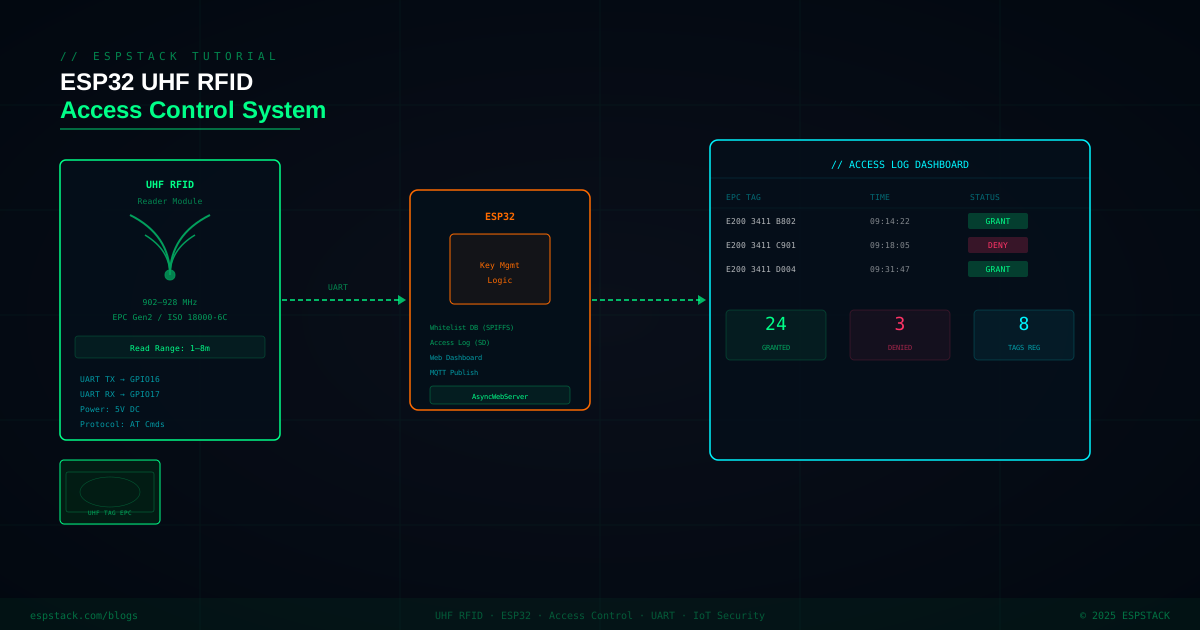
UHF RFID (860–960 MHz) can read passive EPC Gen2 tags from 1–10 metres away — making it perfect for vehicle access gates, warehouse pallet tracking, and personnel management where HF/NFC's 10 cm range is too short. In this tutorial you'll connect a UART-based UHF RFID module to an ESP32, use AT commands to inventory tags in a scan loop, maintain a JSON whitelist in SPIFFS, control a relay on access grant, and serve a live web dashboard where you can view the access log and add or remove tag EPCs — all from a browser on your local network.
// What you'll build: An ESP32-based UHF RFID access controller that scans for EPC Gen2 tags every 500 ms, checks each EPC against a JSON whitelist stored in SPIFFS, activates a relay + green LED on match or sounds a buzzer + red LED on deny, and hosts a web dashboard showing a live access log plus add/remove whitelist controls.
// AD SLOT — IN-CONTENT RESPONSIVE
Prerequisites
| Component / Library | Notes |
|---|---|
| ESP32 DevKit | Any 38-pin variant with accessible UART1 (GPIO16/17) |
| UHF RFID UART module | Any EPC Gen2 module with AT command set, e.g. YRM100, RU5102, or similar; 3.3V or 5V with logic level converter |
| EPC Gen2 UHF tags | ISO 18000-6C sticker tags; 860–960 MHz |
| 5V relay module | Active-low or active-high; optocoupler isolated |
| Red/Green LED + 220Ω resistors | — |
| Active buzzer | 3.3V or via transistor |
| ArduinoJson library | v6.x — install via Library Manager |
| ESPAsyncWebServer | GitHub: me-no-dev/ESPAsyncWebServer |
| AsyncTCP | GitHub: me-no-dev/AsyncTCP (ESP32 dependency) |
Step 1 — Wiring the UHF RFID Module
| Signal | RFID Module Pin | ESP32 GPIO |
|---|---|---|
| UART TX (module output) | TXD | GPIO 16 (Serial2 RX) |
| UART RX (module input) | RXD | GPIO 17 (Serial2 TX) |
| Power | VCC | 5V (use level shifter for 5V modules) |
| Ground | GND | GND |
| Relay IN | — | GPIO 26 |
| Green LED | — | GPIO 25 (via 220Ω) |
| Red LED | — | GPIO 33 (via 220Ω) |
| Buzzer | — | GPIO 32 |
Step 2 — AT Command Reader and EPC Parsing
#include <Arduino.h>
#include <ArduinoJson.h>
#include <SPIFFS.h>

#define RFID_RX 16
#define RFID_TX 17
#define RELAY_PIN  26
#define LED_GREEN  25
#define LED_RED    33
#define BUZZER_PIN 32

HardwareSerial rfidSerial(2);

// Send an AT command and return the response string
String sendAT(const String &cmd, uint32_t timeoutMs = 500) {
  rfidSerial.println(cmd);
  String resp = "";
  uint32_t t0 = millis();
  while (millis() - t0 < timeoutMs) {
    while (rfidSerial.available()) {
      char c = rfidSerial.read();
      resp += c;
    }
  }
  return resp;
}

// Parse EPC from AT+INV response
// Typical response line: +INV:EPC,E2003412011302180540C10B,RSSI,-60
String parseEPC(const String &line) {
  // Find "+INV:EPC," and extract the EPC hex string
  int start = line.indexOf("+INV:EPC,");
  if (start == -1) return "";
  start += 9;
  int end = line.indexOf(",", start);
  if (end == -1) end = line.length();
  return line.substring(start, end);
}

std::vector<String> inventoryTags() {
  std::vector<String> tags;
  String resp = sendAT("AT+INV", 1000);
  // Response may contain multiple +INV:EPC lines
  int pos = 0;
  while (true) {
    int idx = resp.indexOf("+INV:EPC,", pos);
    if (idx == -1) break;
    int eol = resp.indexOf("\n", idx);
    String line = resp.substring(idx, eol);
    String epc = parseEPC(line);
    if (epc.length() > 0) tags.push_back(epc);
    pos = eol + 1;
  }
  return tags;
}

void setup() {
  Serial.begin(115200);
  rfidSerial.begin(115200, SERIAL_8N1, RFID_RX, RFID_TX);
  pinMode(RELAY_PIN,  OUTPUT); digitalWrite(RELAY_PIN,  HIGH); // relay off (active-low)
  pinMode(LED_GREEN,  OUTPUT); digitalWrite(LED_GREEN,  LOW);
  pinMode(LED_RED,    OUTPUT); digitalWrite(LED_RED,    LOW);
  pinMode(BUZZER_PIN, OUTPUT); digitalWrite(BUZZER_PIN, LOW);

  if (!SPIFFS.begin(true)) { Serial.println("SPIFFS mount failed"); }
  delay(500);
  // Check module is alive
  String resp = sendAT("AT", 300);
  Serial.println("RFID module: " + resp);
}
// AD SLOT — IN-CONTENT RESPONSIVE
Step 3 — SPIFFS JSON Whitelist Management
#define WHITELIST_FILE "/whitelist.json"

// Load whitelist from SPIFFS into a DynamicJsonDocument
DynamicJsonDocument loadWhitelist() {
  DynamicJsonDocument doc(4096);
  if (!SPIFFS.exists(WHITELIST_FILE)) {
    doc["tags"] = JsonArray();
    return doc;
  }
  File f = SPIFFS.open(WHITELIST_FILE, "r");
  deserializeJson(doc, f);
  f.close();
  return doc;
}

void saveWhitelist(const DynamicJsonDocument &doc) {
  File f = SPIFFS.open(WHITELIST_FILE, "w");
  serializeJson(doc, f);
  f.close();
}

bool isWhitelisted(const String &epc) {
  DynamicJsonDocument doc = loadWhitelist();
  JsonArray arr = doc["tags"];
  for (const char *tag : arr) {
    if (String(tag).equalsIgnoreCase(epc)) return true;
  }
  return false;
}

void addToWhitelist(const String &epc, const String &label = "") {
  DynamicJsonDocument doc = loadWhitelist();
  JsonArray arr = doc["tags"].as<JsonArray>();
  if (arr.isNull()) arr = doc.createNestedArray("tags");
  arr.add(epc);
  saveWhitelist(doc);
}

void removeFromWhitelist(const String &epc) {
  DynamicJsonDocument doc = loadWhitelist();
  DynamicJsonDocument newDoc(4096);
  JsonArray newArr = newDoc.createNestedArray("tags");
  for (const char *tag : doc["tags"].as<JsonArray>()) {
    if (!String(tag).equalsIgnoreCase(epc)) newArr.add(tag);
  }
  saveWhitelist(newDoc);
}
Step 4 — Access Control Logic and Actuator Output
struct AccessEvent {
  String epc;
  bool granted;
  unsigned long ts;
};

std::vector<AccessEvent> accessLog;

void grantAccess(const String &epc) {
  Serial.println("ACCESS GRANTED: " + epc);
  digitalWrite(RELAY_PIN, LOW);   // relay on (active-low)
  digitalWrite(LED_GREEN, HIGH);
  delay(2000);
  digitalWrite(RELAY_PIN, HIGH);  // relay off
  digitalWrite(LED_GREEN, LOW);
  accessLog.push_back({epc, true, millis()});
  if (accessLog.size() > 50) accessLog.erase(accessLog.begin());
}

void denyAccess(const String &epc) {
  Serial.println("ACCESS DENIED: " + epc);
  digitalWrite(LED_RED, HIGH);
  // 3 short beeps
  for (int i = 0; i < 3; i++) {
    digitalWrite(BUZZER_PIN, HIGH); delay(100);
    digitalWrite(BUZZER_PIN, LOW);  delay(100);
  }
  digitalWrite(LED_RED, LOW);
  accessLog.push_back({epc, false, millis()});
  if (accessLog.size() > 50) accessLog.erase(accessLog.begin());
}

// Call from loop after inventoryTags()
void processTag(const String &epc) {
  if (isWhitelisted(epc)) grantAccess(epc);
  else                     denyAccess(epc);
}
Step 5 — AsyncWebServer Dashboard
#include <WiFi.h>
#include <ESPAsyncWebServer.h>

AsyncWebServer server(80);

const char INDEX_HTML[] PROGMEM = R"rawliteral(
<!DOCTYPE html><html><head>
<title>RFID Access Control</title>
<style>body{background:#0a0e1a;color:#e0e0ff;font-family:sans-serif;padding:20px;}
table{width:100%;border-collapse:collapse;}th,td{padding:8px;border:1px solid #333;text-align:left;}
.granted{color:#00f5ff;}.denied{color:#ff4444;}
input,button{padding:8px;margin:4px;border-radius:4px;border:1px solid #444;background:#1a1f35;color:#fff;}
button{cursor:pointer;background:#00c4cc;}
</style></head><body>
<h2>UHF RFID Access Control</h2>
<h3>Add Tag to Whitelist</h3>
<input id="epc" placeholder="EPC hex string" size="30"/>
<button onclick="addTag()">Add</button>
<h3>Remove Tag</h3>
<input id="repc" placeholder="EPC hex string" size="30"/>
<button onclick="removeTag()">Remove</button>
<h3>Access Log</h3>
<table id="log"><thead><tr><th>Time (ms)</th><th>EPC</th><th>Result</th></tr></thead>
<tbody id="tbody"></tbody></table>
<script>
function refresh(){fetch('/log').then(r=>r.json()).then(d=>{
  let html='';d.forEach(e=>{html+=`<tr><td>${e.ts}</td><td>${e.epc}</td>
  <td class="${e.granted?'granted':'denied'}">${e.granted?'GRANTED':'DENIED'}</td></tr>`;});
  document.getElementById('tbody').innerHTML=html;});}
function addTag(){fetch('/add?epc='+document.getElementById('epc').value).then(refresh);}
function removeTag(){fetch('/remove?epc='+document.getElementById('repc').value).then(refresh);}
setInterval(refresh,2000);refresh();
</script></body></html>
)rawliteral";

void setupWebServer() {
  server.on("/", HTTP_GET, [](AsyncWebServerRequest *req) {
    req->send_P(200, "text/html", INDEX_HTML);
  });

  server.on("/log", HTTP_GET, [](AsyncWebServerRequest *req) {
    DynamicJsonDocument doc(8192);
    JsonArray arr = doc.to<JsonArray>();
    for (auto &ev : accessLog) {
      JsonObject o = arr.createNestedObject();
      o["ts"]      = ev.ts;
      o["epc"]     = ev.epc;
      o["granted"] = ev.granted;
    }
    String out; serializeJson(doc, out);
    req->send(200, "application/json", out);
  });

  server.on("/add", HTTP_GET, [](AsyncWebServerRequest *req) {
    if (req->hasParam("epc")) {
      addToWhitelist(req->getParam("epc")->value());
      req->send(200, "text/plain", "OK");
    } else req->send(400, "text/plain", "Missing epc");
  });

  server.on("/remove", HTTP_GET, [](AsyncWebServerRequest *req) {
    if (req->hasParam("epc")) {
      removeFromWhitelist(req->getParam("epc")->value());
      req->send(200, "text/plain", "OK");
    } else req->send(400, "text/plain", "Missing epc");
  });

  server.begin();
}

void loop() {
  static uint32_t lastScan = 0;
  if (millis() - lastScan > 500) {
    lastScan = millis();
    auto tags = inventoryTags();
    // De-duplicate: only process each EPC once per scan cycle
    std::set<String> seen;
    for (auto &epc : tags) {
      if (seen.find(epc) == seen.end()) {
        seen.insert(epc);
        processTag(epc);
        delay(100); // brief pause between actuations
      }
    }
  }
}
// Warning: The web dashboard uses no authentication in this example. Anyone on the same WiFi network can add or remove whitelist entries. For production deployments, add HTTP Basic Auth using AsyncWebServer's
request->authenticate() or switch to HTTPS with client certificates.
Troubleshooting
| Symptom | Cause | Fix |
|---|---|---|
| AT command returns nothing | Wrong baud rate or UART pins | Try 9600, 38400, and 115200; double-check RFID_RX connects to module TX |
| Tags not detected beyond 30 cm | Reader RF power too low | Send AT+RFPOWER=26 (check your module's max, typically 26–30 dBm) |
| SPIFFS mount failed | Flash partition not formatted | Pass true to SPIFFS.begin() for auto-format on first boot |
| Same tag triggers multiple access events | Inventory loop returns duplicate EPCs | Track last-processed EPC and timestamp; ignore same EPC within 3 seconds |
| Web server returns 404 on /log | Route not registered before server.begin() | Ensure all server.on() calls happen before server.begin() |
Next Steps
- Add timestamps using an RTC module (DS3231 over I2C) so the access log shows wall-clock time instead of milliseconds.
- Log events to an SD card for long-term audit trails that persist across reboots.
- Send MQTT messages on each access event to a Home Assistant or Node-RED dashboard.
- Integrate a PN532 NFC reader for dual-technology (UHF + NFC card) access using the same whitelist.
- Add OTA firmware updates via ArduinoOTA so you can update the controller without physical access.