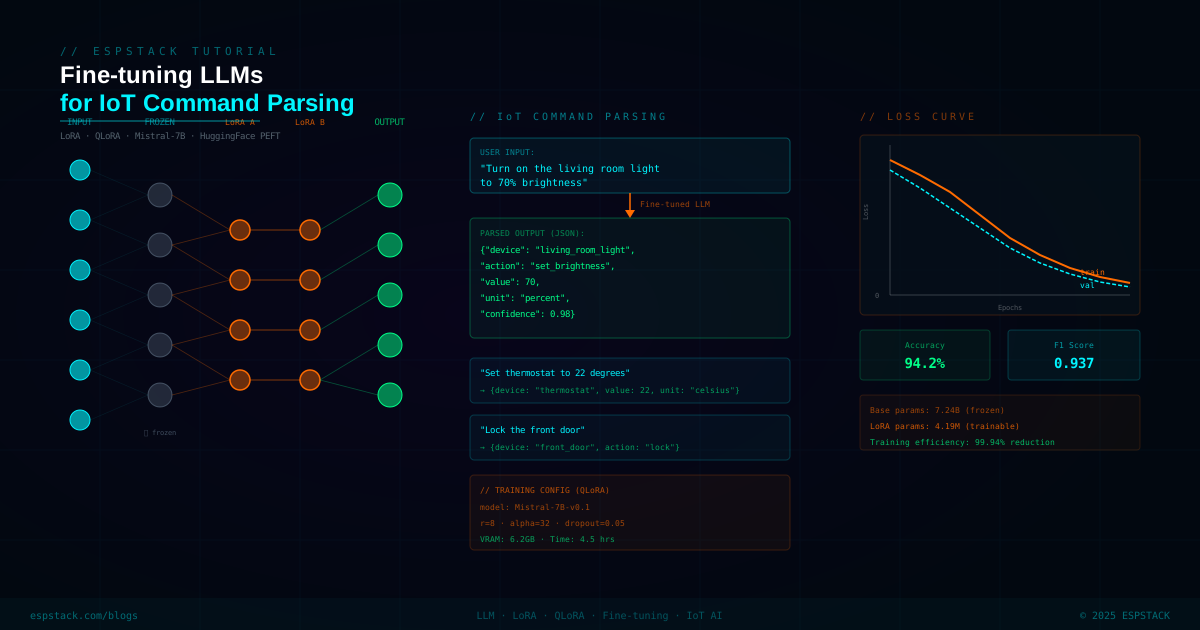
Getting an off-the-shelf LLM to reliably parse IoT device commands is harder than it sounds. Generic models hallucinate field names, ignore unit constraints, and produce inconsistent JSON. Fine-tuning a 7B model with LoRA on a few thousand domain-specific examples fixes all of that — and with QLoRA, you can do it on a single consumer GPU in under two hours. This guide walks through the complete process: dataset creation, QLoRA training, evaluation, and serving the fine-tuned model behind a FastAPI endpoint that your IoT gateway can call.
Mistral-7B (or Llama-3-8B) model that takes a natural language device command like "Set bedroom lights to 40% warm white and turn the fan off" and returns a structured JSON action list — ready to dispatch to your MQTT broker. Trained with QLoRA on a single RTX 3090 / 4090 in ~90 minutes.
Why Fine-tune Instead of Prompting?
Prompt engineering works up to a point. The problem with prompting a base model for structured IoT output:
- Hallucinated keys: the model invents field names not in your schema
- Wrong types: returns a string where you need an integer, or
trueas a string - Inconsistent JSON: sometimes wraps in markdown, sometimes raw, sometimes with trailing commas
- Latency: long system prompts with examples add 200–400 tokens of overhead per call
- Cost: every API call pays for those tokens
A fine-tuned model learns the schema implicitly. Output is clean, consistent, and the inference prompt is minimal — just the user command, no few-shot examples needed.
Prerequisites
| Requirement | Minimum | Recommended |
|---|---|---|
| GPU VRAM | 16 GB (4-bit QLoRA) | 24 GB RTX 3090/4090 |
| System RAM | 32 GB | 64 GB |
| Storage | 50 GB free | 100 GB NVMe |
| Python | 3.10+ | 3.11 |
| CUDA | 11.8 | 12.1 |
| OS | Ubuntu 20.04 | Ubuntu 22.04 |
pip install torch torchvision torchaudio --index-url https://download.pytorch.org/whl/cu121
pip install transformers==4.40.0
pip install peft==0.10.0
pip install trl==0.8.6
pip install bitsandbytes==0.43.1
pip install datasets accelerate
pip install fastapi uvicorn pydantic
Step 1 — Build the Training Dataset
The dataset is pairs of (natural language command, structured JSON output). You need roughly 1,000–3,000 examples for good generalisation. We'll generate them programmatically using templates plus GPT-4o for paraphrasing, then manually review 10%.
// dataset_generator.py — Synthetic IoT command datasetimport json
import random
# Device schema — define your IoT device types and their parameters
DEVICE_SCHEMA = {
"light": {
"actions": ["set_brightness", "set_color_temp", "turn_on", "turn_off"],
"brightness_range": (0, 100),
"color_temp_options": ["warm", "neutral", "cool", "daylight"],
"zones": ["bedroom", "living room", "kitchen", "bathroom", "office"],
},
"thermostat": {
"actions": ["set_temperature", "set_mode"],
"temp_range": (16, 30),
"modes": ["heat", "cool", "auto", "off"],
},
"fan": {
"actions": ["turn_on", "turn_off", "set_speed"],
"speeds": ["low", "medium", "high"],
"zones": ["bedroom", "living room", "office"],
},
"plug": {
"actions": ["turn_on", "turn_off"],
"zones": ["kitchen", "garage", "outdoor"],
},
}
TEMPLATES = [
("Set {zone} {device} to {value}", lambda d, z, v: f"set {d} {v}"),
("Turn {article} {zone} {device} {state}", lambda d, z, v: f"turn {d} {v}"),
("{Verb} the {zone} {device}", lambda d, z, v: f"turn {d} {v}"),
]
def generate_light_example():
zone = random.choice(DEVICE_SCHEMA["light"]["zones"])
brightness = random.randint(0, 100)
color_temp = random.choice(DEVICE_SCHEMA["light"]["color_temp_options"])
nl = f"Set {zone} lights to {brightness}% {color_temp} white"
structured = {
"actions": [
{"device": "light", "zone": zone,
"command": "set_brightness", "value": brightness},
{"device": "light", "zone": zone,
"command": "set_color_temp", "value": color_temp},
]
}
return {"input": nl, "output": json.dumps(structured, separators=(',', ':'))}
def generate_thermostat_example():
temp = round(random.uniform(16, 30), 1)
mode = random.choice(DEVICE_SCHEMA["thermostat"]["modes"])
nl = f"Set the thermostat to {temp}°C in {mode} mode"
structured = {
"actions": [
{"device": "thermostat", "command": "set_temperature", "value": temp},
{"device": "thermostat", "command": "set_mode", "value": mode},
]
}
return {"input": nl, "output": json.dumps(structured, separators=(',', ':'))}
# Generate 3000 examples
examples = []
for _ in range(1500):
examples.append(generate_light_example())
for _ in range(750):
examples.append(generate_thermostat_example())
# ... add fan, plug generators similarly
random.shuffle(examples)
# Split 90/10 train/eval
split = int(len(examples) * 0.9)
with open("train.jsonl", "w") as f:
for ex in examples[:split]:
f.write(json.dumps(ex) + "\n")
with open("eval.jsonl", "w") as f:
for ex in examples[split:]:
f.write(json.dumps(ex) + "\n")
print(f"Generated {len(examples)} examples")Step 2 — QLoRA Training with TRL
QLoRA (Quantized LoRA) loads the base model in 4-bit NF4 format, then trains only the LoRA adapter weights in BF16. On a 24 GB GPU this fits a 7B model comfortably. The adapter is ~20 MB — tiny compared to the 14 GB base model.
import torch
from datasets import load_dataset
from transformers import (
    AutoModelForCausalLM,
    AutoTokenizer,
    BitsAndBytesConfig,
    TrainingArguments,
)
from peft import LoraConfig, TaskType, get_peft_model
from trl import SFTTrainer

BASE_MODEL  = "mistralai/Mistral-7B-v0.3"
OUTPUT_DIR  = "./iot-command-parser-adapter"

# 4-bit NF4 quantization config (QLoRA)
bnb_config = BitsAndBytesConfig(
    load_in_4bit=True,
    bnb_4bit_quant_type="nf4",
    bnb_4bit_compute_dtype=torch.bfloat16,
    bnb_4bit_use_double_quant=True,
)

# Load base model in 4-bit
model = AutoModelForCausalLM.from_pretrained(
    BASE_MODEL,
    quantization_config=bnb_config,
    device_map="auto",
    trust_remote_code=True,
)
model.config.use_cache = False

# Tokenizer
tokenizer = AutoTokenizer.from_pretrained(BASE_MODEL, trust_remote_code=True)
tokenizer.pad_token = tokenizer.eos_token
tokenizer.padding_side = "right"

# LoRA configuration — target attention + feed-forward projections
lora_config = LoraConfig(
    r=16,                           # rank — higher = more capacity, more VRAM
    lora_alpha=32,                  # scaling factor
    target_modules=[                # Mistral attention + FFN layers
        "q_proj", "k_proj", "v_proj", "o_proj",
        "gate_proj", "up_proj", "down_proj",
    ],
    lora_dropout=0.05,
    bias="none",
    task_type=TaskType.CAUSAL_LM,
)

model = get_peft_model(model, lora_config)
model.print_trainable_parameters()
# Output: trainable params: 83,886,080 || all params: 7,325,437,952 || trainable%: 1.14


def format_prompt(example):
    """Convert dataset example to instruct-style prompt."""
    return (
        f"[INST] Parse the following IoT device command into a structured JSON action list.\n"
        f"Command: {example['input']} [/INST] "
        f"{example['output']} "
    )


# Load dataset
train_data = load_dataset("json", data_files="train.jsonl", split="train")
eval_data  = load_dataset("json", data_files="eval.jsonl",  split="train")

# Training arguments
training_args = TrainingArguments(
    output_dir=OUTPUT_DIR,
    num_train_epochs=3,
    per_device_train_batch_size=4,
    gradient_accumulation_steps=4,   # effective batch = 16
    warmup_steps=100,
    learning_rate=2e-4,
    bf16=True,
    logging_steps=25,
    evaluation_strategy="steps",
    eval_steps=200,
    save_strategy="steps",
    save_steps=200,
    load_best_model_at_end=True,
    report_to="none",
)

trainer = SFTTrainer(
    model=model,
    args=training_args,
    train_dataset=train_data,
    eval_dataset=eval_data,
    tokenizer=tokenizer,
    formatting_func=format_prompt,
    max_seq_length=512,
    packing=False,
)

trainer.train()
trainer.save_model(OUTPUT_DIR)
print(f"Adapter saved to {OUTPUT_DIR}")nvidia-smi -l 1 — peak usage is around 20 GB.
Step 3 — Run Inference with the Adapter
After training, load the base model + adapter together and test it locally before deploying.
// inference.py — Load adapter and run inferenceimport torch
import json
from transformers import AutoModelForCausalLM, AutoTokenizer, BitsAndBytesConfig
from peft import PeftModel
BASE_MODEL = "mistralai/Mistral-7B-v0.3"
ADAPTER_PATH = "./iot-command-parser-adapter"
bnb_config = BitsAndBytesConfig(
load_in_4bit=True,
bnb_4bit_quant_type="nf4",
bnb_4bit_compute_dtype=torch.bfloat16,
)
base = AutoModelForCausalLM.from_pretrained(
BASE_MODEL, quantization_config=bnb_config, device_map="auto"
)
model = PeftModel.from_pretrained(base, ADAPTER_PATH)
model.eval()
tokenizer = AutoTokenizer.from_pretrained(BASE_MODEL)
def parse_command(command: str) -> dict:
prompt = (
f"<s>[INST] Parse the following IoT device command into a structured "
f"JSON action list.\nCommand: {command} [/INST] "
)
inputs = tokenizer(prompt, return_tensors="pt").to("cuda")
with torch.no_grad():
output = model.generate(
**inputs,
max_new_tokens=256,
temperature=0.1,
do_sample=True,
eos_token_id=tokenizer.eos_token_id,
)
response = tokenizer.decode(output[0], skip_special_tokens=True)
# Extract JSON from after [/INST]
json_str = response.split("[/INST]")[-1].strip()
return json.loads(json_str)
# Test cases
tests = [
"Set bedroom lights to 40% warm white and turn the fan off",
"Heat the house to 22 degrees",
"Turn off all kitchen plugs",
]
for cmd in tests:
result = parse_command(cmd)
print(f"Input: {cmd}")
print(f"Output: {json.dumps(result, indent=2)}")
print()Input: Set bedroom lights to 40% warm white and turn the fan off
Output: {
"actions": [
{"device": "light", "zone": "bedroom", "command": "set_brightness", "value": 40},
{"device": "light", "zone": "bedroom", "command": "set_color_temp", "value": "warm"},
{"device": "fan", "zone": "bedroom", "command": "turn_off"}
]
}
Input: Heat the house to 22 degrees
Output: {
"actions": [
{"device": "thermostat", "command": "set_temperature", "value": 22.0},
{"device": "thermostat", "command": "set_mode", "value": "heat"}
]
}
Input: Turn off all kitchen plugs
Output: {
"actions": [
{"device": "plug", "zone": "kitchen", "command": "turn_off"}
]
}Step 4 — Serve via FastAPI
Wrap the model in a FastAPI endpoint so your IoT gateway (running on any language) can call it via HTTP POST.
// server.py — FastAPI inference serverimport torch, json
from fastapi import FastAPI, HTTPException
from pydantic import BaseModel
from transformers import AutoModelForCausalLM, AutoTokenizer, BitsAndBytesConfig
from peft import PeftModel
app = FastAPI(title="IoT Command Parser", version="1.0")
BASE_MODEL = "mistralai/Mistral-7B-v0.3"
ADAPTER_PATH = "./iot-command-parser-adapter"
# Load at startup — one model instance shared across requests
print("Loading model...")
bnb_config = BitsAndBytesConfig(
load_in_4bit=True,
bnb_4bit_quant_type="nf4",
bnb_4bit_compute_dtype=torch.bfloat16,
)
_base = AutoModelForCausalLM.from_pretrained(
BASE_MODEL, quantization_config=bnb_config, device_map="auto"
)
_model = PeftModel.from_pretrained(_base, ADAPTER_PATH)
_model.eval()
_tokenizer = AutoTokenizer.from_pretrained(BASE_MODEL)
print("Model ready")
class CommandRequest(BaseModel):
command: str
class ParsedActions(BaseModel):
actions: list
@app.post("/parse", response_model=ParsedActions)
async def parse_command(req: CommandRequest):
prompt = (
f"<s>[INST] Parse the following IoT device command into a structured "
f"JSON action list.\nCommand: {req.command} [/INST] "
)
inputs = _tokenizer(prompt, return_tensors="pt").to("cuda")
with torch.no_grad():
output = _model.generate(
**inputs, max_new_tokens=256, temperature=0.1,
do_sample=True, eos_token_id=_tokenizer.eos_token_id,
)
text = _tokenizer.decode(output[0], skip_special_tokens=True)
json_str = text.split("[/INST]")[-1].strip()
try:
data = json.loads(json_str)
return ParsedActions(actions=data.get("actions", []))
except json.JSONDecodeError:
raise HTTPException(status_code=422, detail="Model returned malformed JSON")
@app.get("/health")
async def health():
return {"status": "ok"}uvicorn server:app --host 0.0.0.0 --port 8000
# Test it
curl -X POST http://localhost:8000/parse \
-H "Content-Type: application/json" \
-d '{"command": "Dim the living room to 60% cool light"}'Step 5 — Evaluation Metrics
Measure your fine-tuned model against the 10% held-out eval set. We care about three things:
| Metric | Definition | Target |
|---|---|---|
| JSON Parse Rate | % of outputs that are valid JSON | > 99% |
| Schema Accuracy | % of actions with correct keys and value types | > 95% |
| Action F1 | Token-level F1 on the action array | > 0.90 |
| Latency (P95) | Inference time on RTX 4090, 4-bit | < 800 ms |
import json
from datasets import load_dataset

eval_data = load_dataset("json", data_files="eval.jsonl", split="train")

total = 0
valid_json = 0
schema_correct = 0

REQUIRED_ACTION_KEYS = {"device", "command", "value"}

for ex in eval_data:
    total += 1
    prediction = parse_command(ex["input"])   # your inference function
    pred_str = json.dumps(prediction)
    try:
        parsed = json.loads(pred_str)
        valid_json += 1
        # Check all actions have required keys
        actions = parsed.get("actions", [])
        if all(REQUIRED_ACTION_KEYS.issubset(a.keys()) for a in actions):
            schema_correct += 1
    except Exception:
        pass

print(f"JSON Parse Rate:   {valid_json/total*100:.1f}%")
print(f"Schema Accuracy:   {schema_correct/total*100:.1f}%")
IoT Gateway Integration
From your IoT gateway (a Raspberry Pi, Jetson Nano, or cloud VM), call the FastAPI endpoint and forward the parsed actions to your MQTT broker:
// gateway.py — Voice/text command → MQTT dispatchimport json, requests
import paho.mqtt.client as mqtt
LLM_ENDPOINT = "http://your-server:8000/parse"
MQTT_BROKER = "your-mqtt-broker.example.com"
mqtt_client = mqtt.Client()
mqtt_client.connect(MQTT_BROKER, 1883, 60)
mqtt_client.loop_start()
def dispatch_command(natural_language: str):
# Call the fine-tuned LLM
resp = requests.post(LLM_ENDPOINT, json={"command": natural_language}, timeout=5)
resp.raise_for_status()
actions = resp.json()["actions"]
# Publish each action to its device topic
for action in actions:
device = action["device"]
zone = action.get("zone", "global")
topic = f"home/{zone}/{device}/command"
payload = json.dumps(action)
mqtt_client.publish(topic, payload, qos=1)
print(f"Published to {topic}: {payload}")
# Example usage
dispatch_command("Set bedroom lights to 40% warm white and turn the fan off")
# Publishes:
# home/bedroom/light/command {"device":"light","zone":"bedroom","command":"set_brightness","value":40}
# home/bedroom/light/command {"device":"light","zone":"bedroom","command":"set_color_temp","value":"warm"}
# home/bedroom/fan/command {"device":"fan","zone":"bedroom","command":"turn_off"}LoRA vs QLoRA — When to Use Which
| Approach | VRAM Required | Training Speed | Quality | Use When |
|---|---|---|---|---|
| Full fine-tune | 80+ GB (multi-GPU) | Slowest | Best | Production, large dataset, A100 cluster |
| LoRA (BF16) | ~40 GB | Fast | Very good | A6000 / A100 single GPU |
| QLoRA (4-bit) | ~20 GB | Moderate | Good | RTX 3090/4090 consumer GPU |
| QLoRA (4-bit) | ~12 GB | Slower | Good | RTX 3080 / A10 — reduce rank to r=8 |
Troubleshooting
| Problem | Cause | Fix |
|---|---|---|
| CUDA OOM during training | Batch too large or rank too high | Reduce per_device_train_batch_size to 2, r to 8 |
| Model outputs partial JSON | max_new_tokens too small |
Increase to 512; check training examples aren't truncated |
| Training loss plateaus at 1.5+ | Learning rate too low or rank too low | Try lr=3e-4 and r=32 for first 500 steps |
| Adapter loads but output is incoherent | Wrong base model loaded | Ensure adapter and base model version match exactly |
bitsandbytes not found |
Platform issue | Install bitsandbytes-cuda121 matching your CUDA version |
Next Steps
- Merge adapter into base: Use
model.merge_and_unload()to bake the LoRA weights into the base model for faster inference (removes adapter overhead) - GGUF + llama.cpp: Quantize the merged model to GGUF and run locally on a Raspberry Pi 5 or Jetson Orin at 3–5 tokens/sec
- vLLM serving: For high-throughput production serving, replace FastAPI with vLLM's OpenAI-compatible server
- Continuous learning: Log incorrect predictions, review weekly, add to training set, retrain adapter — the model keeps improving
- Voice input: Pipe Whisper ASR output directly into the gateway's
dispatch_command()function for a fully voice-controlled smart home