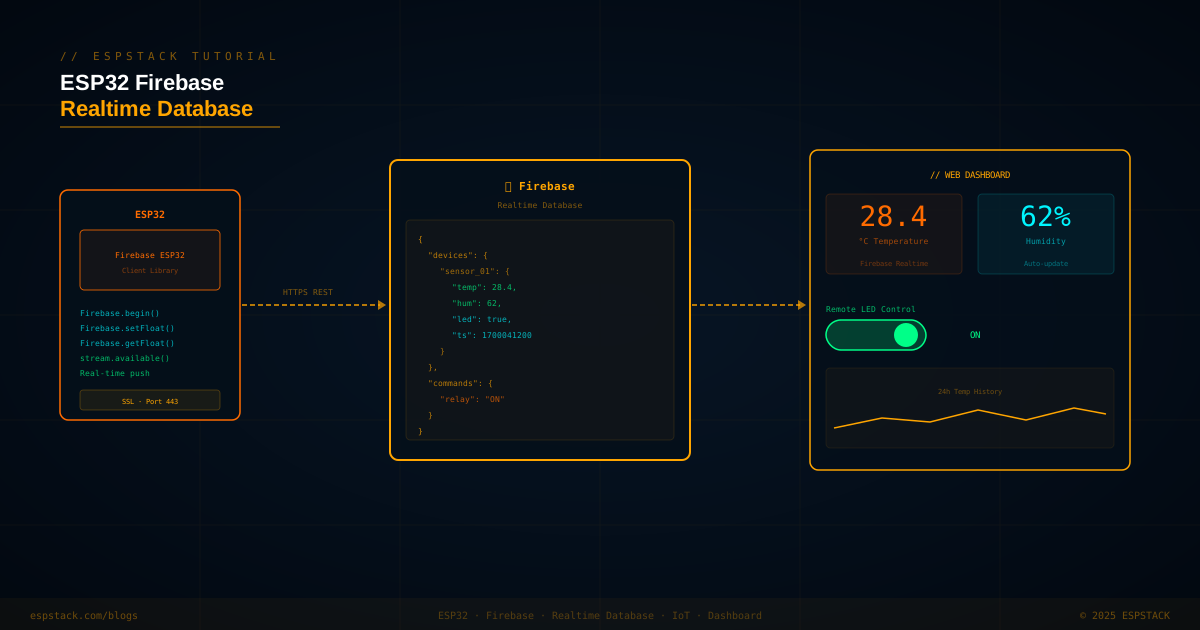
Firebase Realtime Database is one of the most beginner-friendly cloud backends for IoT projects: no server to manage, a simple JSON tree you read and write with REST calls or the Firebase ESP32 client library, and instant push notifications to all connected clients when data changes. In this tutorial you'll wire a DHT22 temperature/humidity sensor to an ESP32, push readings to Firebase every 30 seconds, listen for a remote relay command from a web dashboard, and build the dashboard with plain HTML and the Firebase JavaScript SDK — no frameworks required.
/devices/sensor_01 in Firebase every 30 s. A web dashboard reads those values in real time, plots a 24-hour chart, and lets you toggle a relay via /commands/relay. The ESP32 streams the commands node and toggles a GPIO instantly when the value changes.
Prerequisites
| Component | Quantity | Notes |
|---|---|---|
| ESP32 DevKit | 1 | With WiFi; any variant |
| DHT22 (AM2302) sensor | 1 | Or DHT11; adjust library define accordingly |
| 10 kΩ pull-up resistor | 1 | Between DHT DATA and 3.3 V |
| Relay module (optional) | 1 | For remote command demo; 5 V active-low relay |
Libraries: Firebase ESP32 Client by Mobizt (Library Manager), DHT sensor library by Adafruit.
Step 1 — Firebase Project Setup
- Create a Firebase project at console.firebase.google.com.
- Enable Realtime Database — choose a region, start in test mode (then add rules before going public).
- Copy the Database URL (looks like
https://yourproject-default-rtdb.firebaseio.com/). - Under Project Settings → Service accounts generate a legacy server key, or use the Web API key from the General tab for the client library.
".read": "auth != null". Never ship the database secret in public firmware — use Firebase Auth token exchange for device auth.
Step 2 — Push Sensor Data from ESP32
#include <Arduino.h>
#include <WiFi.h>
#include <Firebase_ESP_Client.h>
#include <DHT.h>
#include "addons/TokenHelper.h"
#include "addons/RTDBHelper.h"

#define WIFI_SSID    "YourSSID"
#define WIFI_PASS    "YourPassword"
#define API_KEY      "YOUR_FIREBASE_API_KEY"
#define DATABASE_URL "https://yourproject-default-rtdb.firebaseio.com/"

#define DHT_PIN  4
#define DHT_TYPE DHT22
#define RELAY_PIN 26

DHT    dht(DHT_PIN, DHT_TYPE);
FirebaseData fbData;
FirebaseAuth auth;
FirebaseConfig config;

bool tokenOk = false;

void tokenStatusCb(TokenInfo info) {
  if (info.status == token_status_ready) tokenOk = true;
}

void setup() {
  Serial.begin(115200);
  dht.begin();
  pinMode(RELAY_PIN, OUTPUT);
  digitalWrite(RELAY_PIN, HIGH); // active-low relay: start OFF

  WiFi.begin(WIFI_SSID, WIFI_PASS);
  while (WiFi.status() != WL_CONNECTED) { delay(500); Serial.print("."); }
  Serial.printf("\nConnected: %s\n", WiFi.localIP().toString().c_str());

  config.api_key      = API_KEY;
  config.database_url = DATABASE_URL;
  config.token_status_callback = tokenStatusCb;

  Firebase.begin(&config, &auth);
  Firebase.reconnectWiFi(true);
}

uint32_t lastPush = 0;

void pushSensorData() {
  float temp = dht.readTemperature();
  float hum  = dht.readHumidity();
  if (isnan(temp) || isnan(hum)) { Serial.println("DHT read error"); return; }

  FirebaseJson json;
  json.set("temp", temp);
  json.set("hum",  hum);
  json.set("ts",   (long)time(nullptr));

  if (Firebase.RTDB.setJSON(&fbData, "/devices/sensor_01", &json)) {
    Serial.printf("Pushed: %.1f°C  %.0f%%\n", temp, hum);
  } else {
    Serial.printf("Push error: %s\n", fbData.errorReason().c_str());
  }
}

void checkCommands() {
  String relay;
  if (Firebase.RTDB.getString(&fbData, "/commands/relay", &relay)) {
    digitalWrite(RELAY_PIN, relay == "ON" ? LOW : HIGH);
  }
}

void loop() {
  if (!Firebase.ready() || !tokenOk) return;

  if (millis() - lastPush > 30000) {
    lastPush = millis();
    pushSensorData();
    checkCommands();
  }
}Step 3 — Real-time Stream for Instant Commands
Polling /commands/relay every 30 seconds is fine for slow telemetry but too slow for a relay toggle. Use Firebase's streaming API to receive push notifications the moment the value changes.
FirebaseData streamData;

void streamCb(FirebaseStream data) {
  if (data.dataTypeEnum() == fb_esp_rtdb_data_type_string) {
    String val = data.stringData();
    digitalWrite(RELAY_PIN, val == "ON" ? LOW : HIGH);
    Serial.printf("Relay command: %s\n", val.c_str());
  }
}

void streamTimeout(bool timeout) {
  if (timeout) Serial.println("Stream timeout — reconnecting");
}

// Call once after Firebase.begin()
void startStream() {
  if (!Firebase.RTDB.beginStream(&streamData, "/commands")) {
    Serial.printf("Stream error: %s\n", streamData.errorReason().c_str());
  }
  Firebase.RTDB.setStreamCallback(&streamData, streamCb, streamTimeout);
}
Step 4 — Web Dashboard (HTML + Firebase JS SDK)
<!-- dashboard.html -->
<script type="module">
import { initializeApp }     from "https://www.gstatic.com/firebasejs/10.8.0/firebase-app.js";
import { getDatabase, ref, onValue, set }
  from "https://www.gstatic.com/firebasejs/10.8.0/firebase-database.js";

const app = initializeApp({ apiKey:"...", databaseURL:"..." });
const db  = getDatabase(app);

// Live sensor display
onValue(ref(db, "/devices/sensor_01"), snap => {
  const d = snap.val();
  document.getElementById("temp").textContent = d.temp.toFixed(1) + " °C";
  document.getElementById("hum").textContent  = d.hum.toFixed(0) + " %";
});

// Relay toggle button
document.getElementById("relay-btn").onclick = async () => {
  const snap = await get(ref(db, "/commands/relay"));
  const current = snap.val();
  await set(ref(db, "/commands/relay"), current === "ON" ? "OFF" : "ON");
};
</script>
Troubleshooting
| Symptom | Likely Cause | Fix |
|---|---|---|
| Firebase.ready() always false | API key incorrect or no internet | Verify API key from Firebase console; check WiFi connection and DNS |
| Push succeeds but data not visible in console | Wrong database URL (missing trailing /) | URL must be exact; test with a REST GET: curl [url]/.json |
| DHT returns NaN | No pull-up resistor or bad pin | Add 10 kΩ between DATA and 3.3 V; avoid GPIO 0/2/15 which affect boot |
| Stream disconnects frequently | Poor WiFi or Firebase 30-min token refresh | Call Firebase.reconnectWiFi(true); keep token auto-refresh enabled |
| ESP32 heap exhausted after hours of uptime | FirebaseData accumulates response strings | Call fbData.clear() after each operation or use separate FirebaseData per operation |
Next Steps
- Add Firebase Authentication so only logged-in users can read/write the database — replace test-mode rules with user-scoped rules.
- Use Firebase Cloud Functions to trigger an email or push notification when temperature exceeds a threshold.
- Store historical readings in Firebase's Firestore (not RTDB) with a TTL Cloud Function to automatically prune data older than 7 days.
- Add a deep-sleep cycle — push data every 10 minutes and sleep between readings to run the ESP32 from a LiPo battery for weeks.