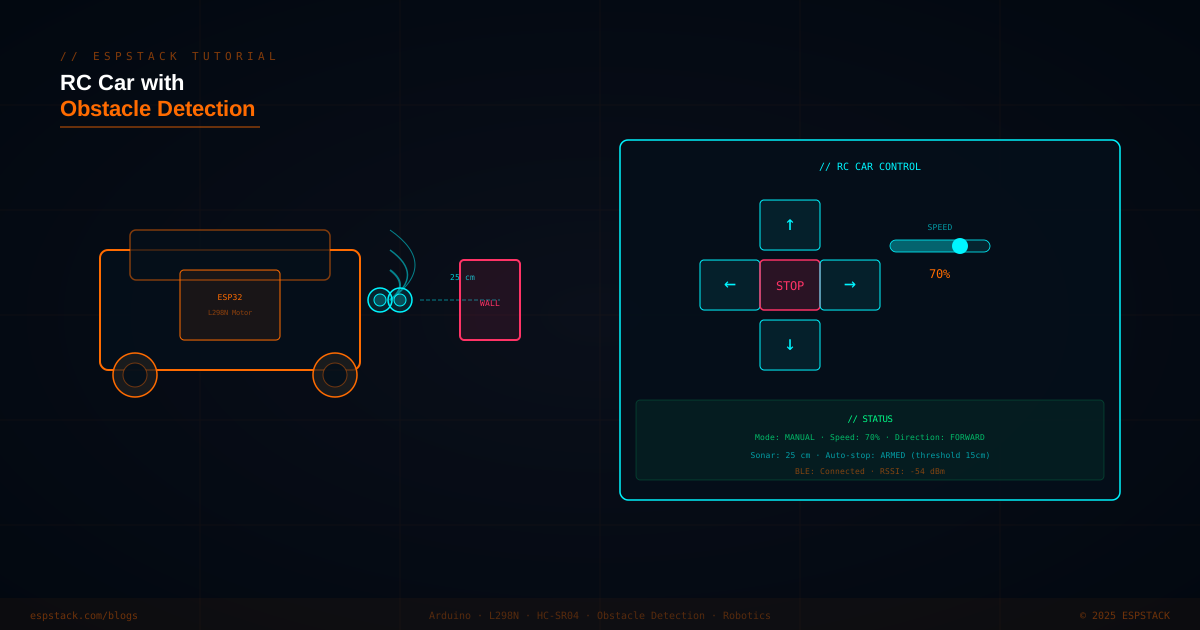
An RC car powered by an ESP32 gives you the full TCP/IP stack on your robot — serve a browser-based joystick interface from the ESP32 itself, accept directional commands over WebSocket for low latency, and add an HC-SR04 ultrasonic sensor to automatically brake when an obstacle is closer than a configurable threshold. The L298N dual H-bridge lets you drive two DC motors independently with PWM speed control, giving you both forward/reverse and differential steering. In this tutorial you'll assemble the hardware, write the motor and sensor code, serve a mobile-friendly control page, and add auto-stop safety logic.
// What you'll build: An ESP32-based RC car with L298N motor driver (two DC motors, PWM speed control), HC-SR04 front sonar (15 cm auto-stop threshold), and a WebSocket-controlled browser joystick served from the ESP32 itself. Manual mode overrides are possible; auto-stop engages even during manual drive.
// AD SLOT — IN-CONTENT RESPONSIVE
Prerequisites
| Component | Quantity | Notes |
|---|---|---|
| ESP32 DevKit (38-pin) | 1 | Any variant with WiFi |
| L298N dual H-bridge module | 1 | Drives 2 DC motors; 7–35 V motor supply, 5 V logic |
| DC gear motors with wheels | 2 | Standard TT motors (3–6 V, 200 RPM) |
| HC-SR04 ultrasonic sensor | 1 | Range 2–400 cm; 5 V supply, 3.3 V trigger compatible |
| 7.4 V LiPo battery (2S) | 1 | Powers motors via L298N; 5 V reg on L298N powers ESP32 |
| Car chassis with caster wheel | 1 | Any two-wheel differential drive chassis |
| 1 kΩ + 2 kΩ resistors | 1 pair | Voltage divider for HC-SR04 ECHO (5 V → 3.3 V) |
Step 1 — Wiring the L298N and Motors
| L298N Pin | ESP32 GPIO | Notes |
|---|---|---|
| ENA (Motor A PWM) | GPIO 25 | PWM speed control, Motor A |
| IN1 | GPIO 26 | Motor A direction |
| IN2 | GPIO 27 | Motor A direction |
| ENB (Motor B PWM) | GPIO 14 | PWM speed control, Motor B |
| IN3 | GPIO 12 | Motor B direction |
| IN4 | GPIO 13 | Motor B direction |
| VCC (logic) | 5 V from L298N onboard reg | Connect L298N 5V → ESP32 VIN if powering ESP32 from same battery |
| VSS (motor supply) | 7.4 V LiPo + | — |
| GND | GND (shared) | — |
| HC-SR04 Pin | ESP32 GPIO | Notes |
|---|---|---|
| VCC | 5 V | From L298N 5 V output |
| TRIG | GPIO 32 | Direct connection (3.3 V trigger accepted) |
| ECHO | GPIO 33 via divider | 5 V ECHO → 1 kΩ → GPIO → 2 kΩ → GND |
| GND | GND | — |
Step 2 — Motor Control with PWM
#include <Arduino.h>
#include <WiFi.h>
#include <ESPAsyncWebServer.h>

// Motor A (left)
#define ENA 25
#define IN1 26
#define IN2 27
// Motor B (right)
#define ENB 14
#define IN3 12
#define IN4 13

// HC-SR04
#define TRIG_PIN 32
#define ECHO_PIN 33
#define STOP_DIST_CM 15

// LEDC channels
#define CH_A 0
#define CH_B 1
#define PWM_FREQ 1000
#define PWM_RES  8   // 0–255

void motorSetup() {
  ledcSetup(CH_A, PWM_FREQ, PWM_RES);
  ledcSetup(CH_B, PWM_FREQ, PWM_RES);
  ledcAttachPin(ENA, CH_A);
  ledcAttachPin(ENB, CH_B);
  pinMode(IN1, OUTPUT); pinMode(IN2, OUTPUT);
  pinMode(IN3, OUTPUT); pinMode(IN4, OUTPUT);
}

void setMotor(int ch, int in1Pin, int in2Pin, int speed) {
  // speed: -255 to 255
  if (speed > 0) {
    digitalWrite(in1Pin, HIGH); digitalWrite(in2Pin, LOW);
    ledcWrite(ch, speed);
  } else if (speed < 0) {
    digitalWrite(in1Pin, LOW); digitalWrite(in2Pin, HIGH);
    ledcWrite(ch, -speed);
  } else {
    digitalWrite(in1Pin, LOW); digitalWrite(in2Pin, LOW);
    ledcWrite(ch, 0);
  }
}

void drive(int leftSpeed, int rightSpeed) {
  setMotor(CH_A, IN1, IN2, leftSpeed);
  setMotor(CH_B, IN3, IN4, rightSpeed);
}

// Convenience
void forward(int spd)  { drive(spd, spd); }
void backward(int spd) { drive(-spd, -spd); }
void turnLeft(int spd) { drive(-spd, spd); }
void turnRight(int spd){ drive(spd, -spd); }
void stopMotors()      { drive(0, 0); }
Step 3 — HC-SR04 Distance Measurement
void sonarSetup() {
  pinMode(TRIG_PIN, OUTPUT);
  pinMode(ECHO_PIN, INPUT);
}

float readDistanceCm() {
  digitalWrite(TRIG_PIN, LOW);
  delayMicroseconds(2);
  digitalWrite(TRIG_PIN, HIGH);
  delayMicroseconds(10);
  digitalWrite(TRIG_PIN, LOW);

  long duration = pulseIn(ECHO_PIN, HIGH, 30000); // 30 ms timeout
  if (duration == 0) return 999.0f; // no echo = clear path
  return duration * 0.0343f / 2.0f;
}
// AD SLOT — IN-CONTENT RESPONSIVE
Step 4 — WebSocket Control Server
const char *ssid = "YourSSID";
const char *pass = "YourPassword";

AsyncWebServer server(80);
AsyncWebSocket ws("/ws");

int targetLeft = 0, targetRight = 0;

void handleWSMessage(const String &msg) {
  // Expected format: "FWD:180", "BCK:180", "LFT:150", "RGT:150", "STP"
  if (msg == "STP") { targetLeft = 0; targetRight = 0; }
  else if (msg.startsWith("FWD:")) { int s = msg.substring(4).toInt(); targetLeft = targetRight = s; }
  else if (msg.startsWith("BCK:")) { int s = msg.substring(4).toInt(); targetLeft = targetRight = -s; }
  else if (msg.startsWith("LFT:")) { int s = msg.substring(4).toInt(); targetLeft = -s; targetRight = s; }
  else if (msg.startsWith("RGT:")) { int s = msg.substring(4).toInt(); targetLeft = s; targetRight = -s; }
}

void onWSEvent(AsyncWebSocket *s, AsyncWebSocketClient *c,
               AwsEventType type, void *arg, uint8_t *data, size_t len) {
  if (type == WS_EVT_DATA) {
    AwsFrameInfo *info = (AwsFrameInfo *)arg;
    if (info->opcode == WS_TEXT) {
      data[len] = 0;
      handleWSMessage(String((char *)data));
    }
  }
}

void setupServer() {
  ws.onEvent(onWSEvent);
  server.addHandler(&ws);
  server.on("/", HTTP_GET, [](AsyncWebServerRequest *req) {
    // Serve inline HTML joystick UI
    req->send(200, "text/html", R"(
<!DOCTYPE html><html><body style="background:#111;color:#fff;font-family:monospace;text-align:center">
<h2>RC CAR</h2>
<button ontouchstart="send('FWD:200')" ontouchend="send('STP')" style="padding:20px 40px">▲ FWD</button><br>
<button ontouchstart="send('LFT:180')" ontouchend="send('STP')">◄ L</button>
<button ontouchstart="send('STP')">■ STOP</button>
<button ontouchstart="send('RGT:180')" ontouchend="send('STP')">R ►</button><br>
<button ontouchstart="send('BCK:180')" ontouchend="send('STP')">▼ BCK</button>
<p id="dist">Sonar: --</p>
<script>
const ws=new WebSocket('ws://'+location.host+'/ws');
ws.onmessage=e=>document.getElementById('dist').textContent='Sonar: '+e.data+' cm';
function send(cmd){ws.send(cmd);}
</script>
</body></html>
    )");
  });
  server.begin();
}
Step 5 — Main Loop with Auto-Stop Safety
void setup() {
  Serial.begin(115200);
  motorSetup();
  sonarSetup();
  stopMotors();

  WiFi.begin(ssid, pass);
  while (WiFi.status() != WL_CONNECTED) { delay(500); Serial.print("."); }
  Serial.printf("\nIP: %s\n", WiFi.localIP().toString().c_str());

  setupServer();
}

void loop() {
  ws.cleanupClients();

  float dist = readDistanceCm();

  // Broadcast distance to all connected WebSocket clients
  static uint32_t lastBroadcast = 0;
  if (millis() - lastBroadcast > 200) {
    lastBroadcast = millis();
    ws.textAll(String(dist, 1));
  }

  // Safety auto-stop: block forward motion if obstacle within threshold
  bool blocked = (dist < STOP_DIST_CM);
  int left  = (blocked && targetLeft  > 0) ? 0 : targetLeft;
  int right = (blocked && targetRight > 0) ? 0 : targetRight;

  drive(left, right);
  delay(10);
}
// Note: The auto-stop only blocks forward motion — backward and turning commands still work so the car can escape a corner. Adjust
STOP_DIST_CM to suit your speed and reaction time; at full speed (255 PWM) 15 cm gives about 100 ms stopping margin with typical gear motors.
Troubleshooting
| Symptom | Likely Cause | Fix |
|---|---|---|
| Motors spin but wrong direction | IN1/IN2 or IN3/IN4 swapped | Swap the two wires to one motor, or swap IN1/IN2 in code |
| ESP32 resets under motor load | Back-EMF spike through shared ground | Add 0.1 µF ceramic capacitors across motor terminals; ensure stable battery |
| HC-SR04 returns 0 or 999 always | ECHO pin getting 5 V without divider | Add 1 kΩ / 2 kΩ voltage divider on ECHO; verify TRIG pulse with oscilloscope |
| WebSocket disconnects mid-drive | WiFi packet loss | Add keep-alive ping in JS: setInterval(()=>ws.send('PING'),1000) |
| Car drifts to one side at same speed | Motor speed mismatch | Calibrate by reducing stronger motor's PWM value in drive() |
Next Steps
- Add a servo-mounted HC-SR04 that sweeps left and right to build a full obstacle map and implement autonomous navigation.
- Replace the browser joystick with a Flutter app using a virtual joystick widget for smoother proportional speed control.
- Stream ESP32-CAM video (MJPEG) over HTTP alongside the WebSocket control for a first-person-view (FPV) experience.
- Add line-following mode using an IR reflective sensor array and a PID controller for smooth track following.