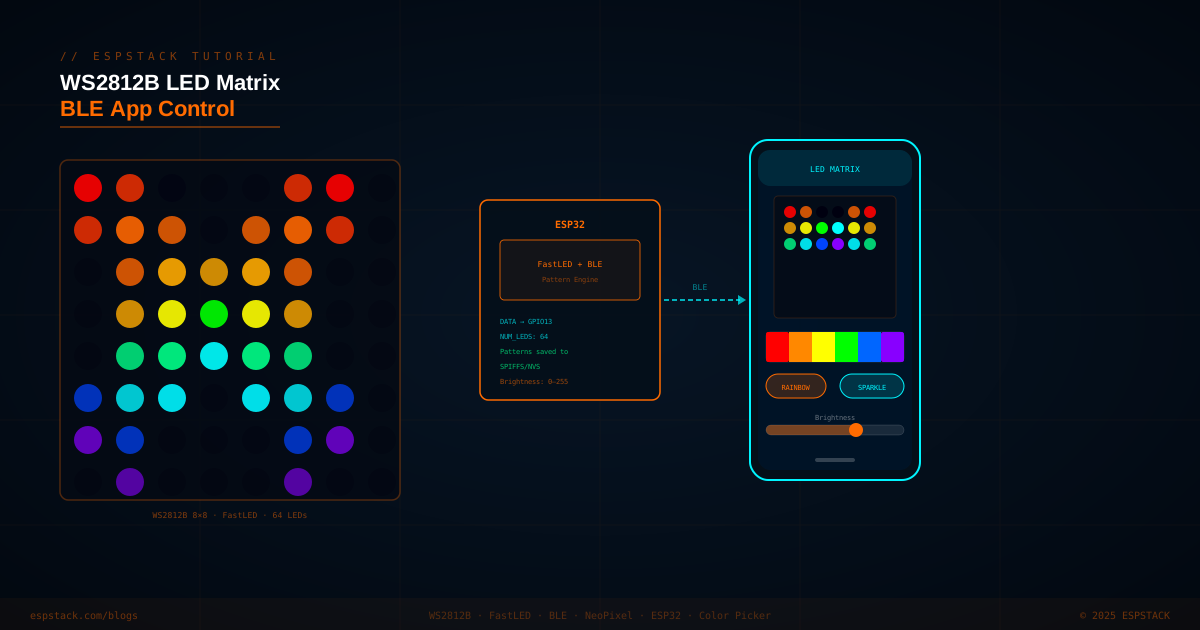
A WS2812B 8×8 LED matrix gives you 64 individually addressable RGB pixels in a compact panel — perfect for animations, scrolling text, ambient lighting, and real-time visualizations. In this tutorial you'll use FastLED to drive the panel from an ESP32, then expose a BLE GATT service so a mobile app can switch patterns, pick a solid color from a color wheel, and adjust brightness in real time. Pattern selections are persisted to NVS so the last-used mode survives a power cycle.
Prerequisites
| Component | Quantity | Notes |
|---|---|---|
| ESP32 DevKit (38-pin) | 1 | Any variant; BLE required |
| WS2812B 8×8 LED matrix panel | 1 | 64 LEDs, single data line |
| 5 V / 3 A power supply | 1 | All 64 LEDs at full white ≈ 3.8 A — use adequate supply |
| 470 Ω resistor | 1 | In series with DATA line to prevent ringing |
| 1000 µF / 10 V capacitor | 1 | Across power supply rails to absorb current spikes |
| Jumper wires | — | — |
Software: Arduino IDE 2.x with ESP32 by Espressif board package. Libraries: FastLED by Daniel Garcia (Library Manager), Preferences (built-in ESP32 core), BLEDevice (built-in ESP32 core).
Step 1 — Wiring the Matrix
WS2812B panels use a single serial data line. Power the panel directly from your 5 V supply — not from the ESP32's 3.3 V pin, which can only source ~50 mA. Tie ESP32 and supply grounds together.
| Signal | Matrix Pin | ESP32 GPIO |
|---|---|---|
| DATA IN | DIN | GPIO 13 (via 470 Ω) |
| VCC | +5 V | 5 V supply |
| GND | GND | GND (shared with ESP32) |
Step 2 — FastLED Setup and Pattern Engine
FastLED abstracts the WS2812B protocol and provides a rich set of color utilities. Define the strip, implement a few patterns, and track the active one via an index stored in NVS.
#include <FastLED.h>
#include <Preferences.h>

#define DATA_PIN   13
#define NUM_LEDS   64
#define LED_TYPE   WS2812B
#define COLOR_ORDER GRB

CRGB leds[NUM_LEDS];
Preferences prefs;

uint8_t  gBrightness = 80;
uint8_t  gPattern    = 0;   // 0=Rainbow, 1=Sparkle, 2=Solid, 3=Fire
CRGB     gSolidColor = CRGB::DeepSkyBlue;

// --- Patterns ---
void patternRainbow() {
  static uint8_t hue = 0;
  fill_rainbow(leds, NUM_LEDS, hue++, 4);
}

void patternSparkle() {
  fadeToBlackBy(leds, NUM_LEDS, 30);
  int pos = random16(NUM_LEDS);
  leds[pos] += CHSV(random8(), 200, 255);
}

void patternSolid() {
  fill_solid(leds, NUM_LEDS, gSolidColor);
}

void patternFire() {
  static uint8_t heat[NUM_LEDS];
  // Cool down every cell
  for (int i = 0; i < NUM_LEDS; i++)
    heat[i] = qsub8(heat[i], random8(0, ((55 * 10) / NUM_LEDS) + 2));
  // Drift heat up
  for (int k = NUM_LEDS - 1; k >= 2; k--)
    heat[k] = (heat[k-1] + heat[k-2] + heat[k-2]) / 3;
  // Randomly ignite new sparks near bottom
  if (random8() < 120)
    heat[random8(7)] = qadd8(heat[random8(7)], random8(160, 255));
  // Convert heat to LED color
  for (int j = 0; j < NUM_LEDS; j++)
    leds[j] = HeatColor(heat[j]);
}

void runPattern() {
  switch (gPattern) {
    case 0: patternRainbow(); break;
    case 1: patternSparkle(); break;
    case 2: patternSolid();   break;
    case 3: patternFire();    break;
    default: patternRainbow();
  }
}
Step 3 — BLE GATT Service
Expose three BLE characteristics: one for pattern index (uint8), one for solid color (3-byte RGB), and one for brightness (uint8). The mobile app writes to these; the ESP32 applies the values immediately and saves them to NVS.
#include <BLEDevice.h>
#include <BLEServer.h>
#include <BLEUtils.h>
#include <BLE2902.h>

#define SERVICE_UUID        "12345678-1234-1234-1234-123456789abc"
#define CHAR_PATTERN_UUID   "12345678-1234-1234-1234-123456789ab1"
#define CHAR_COLOR_UUID     "12345678-1234-1234-1234-123456789ab2"
#define CHAR_BRIGHT_UUID    "12345678-1234-1234-1234-123456789ab3"

BLECharacteristic *pPattern, *pColor, *pBright;

class LedCallback : public BLECharacteristicCallbacks {
  void onWrite(BLECharacteristic *pChar) override {
    std::string val = pChar->getValue();
    if (val.empty()) return;

    if (pChar == pPattern) {
      gPattern = (uint8_t)val[0];
      prefs.putUChar("pattern", gPattern);
    } else if (pChar == pColor && val.size() >= 3) {
      gSolidColor = CRGB((uint8_t)val[0], (uint8_t)val[1], (uint8_t)val[2]);
      prefs.putUChar("r", gSolidColor.r);
      prefs.putUChar("g", gSolidColor.g);
      prefs.putUChar("b", gSolidColor.b);
    } else if (pChar == pBright) {
      gBrightness = (uint8_t)val[0];
      FastLED.setBrightness(gBrightness);
      prefs.putUChar("bright", gBrightness);
    }
  }
};

void setupBLE() {
  BLEDevice::init("LED_MATRIX");
  BLEServer   *pServer  = BLEDevice::createServer();
  BLEService  *pService = pServer->createService(SERVICE_UUID);

  LedCallback *cb = new LedCallback();

  pPattern = pService->createCharacteristic(
    CHAR_PATTERN_UUID,
    BLECharacteristic::PROPERTY_READ | BLECharacteristic::PROPERTY_WRITE
  );
  pPattern->setCallbacks(cb);

  pColor = pService->createCharacteristic(
    CHAR_COLOR_UUID,
    BLECharacteristic::PROPERTY_READ | BLECharacteristic::PROPERTY_WRITE
  );
  pColor->setCallbacks(cb);

  pBright = pService->createCharacteristic(
    CHAR_BRIGHT_UUID,
    BLECharacteristic::PROPERTY_READ | BLECharacteristic::PROPERTY_WRITE
  );
  pBright->setCallbacks(cb);

  pService->start();
  pServer->getAdvertising()->start();
  Serial.println("BLE advertising as LED_MATRIX");
}Step 4 — NVS Persistence and Full setup()/loop()
Load saved settings from NVS at boot so the matrix resumes the last-used pattern and brightness even after a power cut.
void setup() {
  Serial.begin(115200);

  // Load saved preferences
  prefs.begin("ledmatrix", false);
  gPattern    = prefs.getUChar("pattern", 0);
  gBrightness = prefs.getUChar("bright", 80);
  gSolidColor = CRGB(
    prefs.getUChar("r", 0),
    prefs.getUChar("g", 140),
    prefs.getUChar("b", 255)
  );

  FastLED.addLeds<LED_TYPE, DATA_PIN, COLOR_ORDER>(leds, NUM_LEDS)
         .setCorrection(TypicalLEDStrip);
  FastLED.setBrightness(gBrightness);

  setupBLE();
}

void loop() {
  EVERY_N_MILLISECONDS(20) {
    runPattern();
    FastLED.show();
  }
}
Step 5 — Mobile App BLE Commands
Any BLE GATT client can control the matrix. Below is the write payload format for each characteristic, and example Flutter code using flutter_blue_plus.
| Characteristic | Write Payload | Example |
|---|---|---|
| Pattern | 1 byte — pattern index (0–3) | [0x01] → Sparkle |
| Color (RGB) | 3 bytes — R, G, B each 0–255 | [0xFF, 0x00, 0x88] → pink |
| Brightness | 1 byte — 0–255 | [0x80] → 50% |
// Flutter (flutter_blue_plus) — write pattern
Future<void> setPattern(int index) async {
  await patternChar.write([index], withoutResponse: false);
}

// Write solid color
Future<void> setColor(Color c) async {
  await colorChar.write([c.red, c.green, c.blue], withoutResponse: false);
}

// Write brightness (0–255)
Future<void> setBrightness(double pct) async {
  await brightChar.write([(pct * 255).round()], withoutResponse: false);
}
Troubleshooting
| Symptom | Likely Cause | Fix |
|---|---|---|
| LEDs flicker or show wrong colors | Noise on DATA line | Add 470 Ω series resistor; ensure shared GND between ESP32 and 5 V supply |
| ESP32 resets under load | Insufficient 5 V supply current | Use ≥3 A supply; add bulk capacitor (1000 µF) across supply rails |
| BLE not visible on phone | BLE advertising not started | Verify getAdvertising()->start() is called; restart ESP32 |
| Pattern doesn't persist after reboot | NVS not committed | Confirm prefs.begin() name matches read and write calls |
| Fire pattern looks flat | NUM_LEDS too small for heat array | Works best on >16 LEDs in a column — try mapping matrix columns as 8-LED strips |
Next Steps
- Add a scrolling text pattern that renders 5×7 character bitmaps across the 8×8 grid for short messages sent over BLE.
- Implement a BLE Notify on a "status" characteristic to push current FPS and pattern name back to the app.
- Connect a microphone (INMP441) and build a real-time audio spectrum analyzer visualizer using FastLED's FFT support.
- Chain multiple 8×8 panels into a 64×8 banner and add a UDP broadcast receiver so multiple panels sync over WiFi.