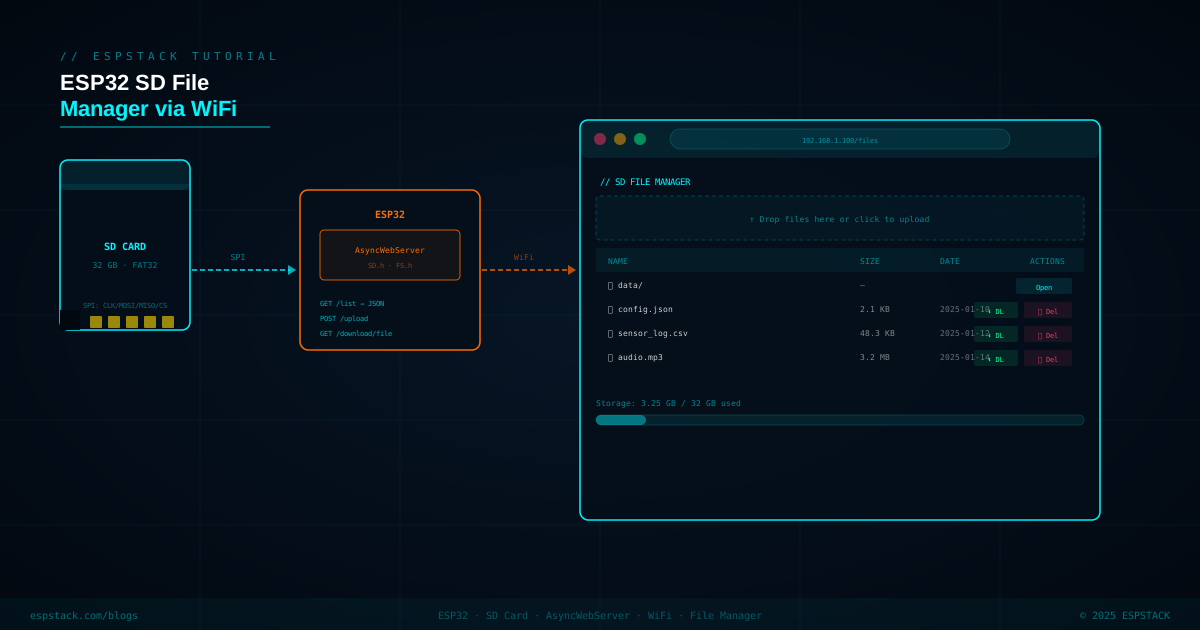
Logging sensor data to an SD card is common, but retrieving that data typically means physically removing the card. With AsyncWebServer and the ESP32's WiFi, you can expose a full browser-based file manager — list directory contents as JSON, upload files with drag-and-drop, download any file by clicking a link, and delete files you no longer need. Everything runs locally on your LAN at speeds determined by your card's SPI interface (typically 1–3 MB/s on a Class 10 card).
Prerequisites
| Component | Quantity | Notes |
|---|---|---|
| ESP32 DevKit (38-pin) | 1 | With WiFi; WROVER recommended for larger file ops |
| MicroSD card module (SPI) | 1 | 5 V tolerant module with 3.3 V regulator on-board |
| MicroSD card (≤32 GB) | 1 | FAT32 formatted — exFAT not supported by SD.h |
| Jumper wires | — | — |
Libraries: ESPAsyncWebServer by me-no-dev, AsyncTCP by me-no-dev, SD and FS (both built into ESP32 core).
Step 1 — SPI Wiring for SD Module
| Signal | SD Module Pin | ESP32 GPIO |
|---|---|---|
| SCLK | CLK / SCK | GPIO 18 (VSPI CLK) |
| MOSI | MOSI / DI | GPIO 23 (VSPI MOSI) |
| MISO | MISO / DO | GPIO 19 (VSPI MISO) |
| CS | CS / SS | GPIO 5 |
| VCC | VCC | 3.3 V |
| GND | GND | GND |
Step 2 — Initialize SD and Build File Listing API
#include <Arduino.h>
#include <WiFi.h>
#include <SD.h>
#include <FS.h>
#include <ESPAsyncWebServer.h>
#include <ArduinoJson.h>

#define SD_CS 5

const char *ssid = "YourSSID";
const char *pass = "YourPassword";

AsyncWebServer server(80);

bool initSD() {
  if (!SD.begin(SD_CS)) {
    Serial.println("SD init failed");
    return false;
  }
  Serial.printf("SD OK — %llu MB total\n", SD.totalBytes() / (1024*1024));
  return true;
}

// Returns JSON array of file info for a directory path
String buildFileList(const char *path) {
  StaticJsonDocument<4096> doc;
  JsonArray arr = doc.to<JsonArray>();

  File root = SD.open(path);
  if (!root || !root.isDirectory()) return "[]";

  File entry = root.openNextFile();
  while (entry) {
    JsonObject obj = arr.createNestedObject();
    obj["name"] = String(entry.name());
    obj["size"] = entry.isDirectory() ? 0 : (long)entry.size();
    obj["dir"]  = entry.isDirectory();
    entry = root.openNextFile();
  }

  String out;
  serializeJson(doc, out);
  return out;
}
Step 3 — AsyncWebServer Endpoints
void setupRoutes() {
  // Serve the HTML UI
  server.on("/", HTTP_GET, [](AsyncWebServerRequest *req) {
    req->send(SD, "/index.html", "text/html");
  });

  // GET /list?path=/  → JSON file list
  server.on("/list", HTTP_GET, [](AsyncWebServerRequest *req) {
    String path = req->hasParam("path") ? req->getParam("path")->value() : "/";
    req->send(200, "application/json", buildFileList(path.c_str()));
  });

  // GET /download?file=/sensor_log.csv
  server.on("/download", HTTP_GET, [](AsyncWebServerRequest *req) {
    if (!req->hasParam("file")) {
      req->send(400, "text/plain", "Missing file param");
      return;
    }
    String filepath = req->getParam("file")->value();
    if (!SD.exists(filepath)) {
      req->send(404, "text/plain", "Not found");
      return;
    }
    req->send(SD, filepath, "application/octet-stream", true);
  });

  // DELETE /delete?file=/old.csv
  server.on("/delete", HTTP_DELETE, [](AsyncWebServerRequest *req) {
    if (!req->hasParam("file")) { req->send(400); return; }
    String fp = req->getParam("file")->value();
    if (SD.remove(fp)) req->send(200, "text/plain", "Deleted");
    else req->send(500, "text/plain", "Delete failed");
  });

  // POST /upload — multipart form upload
  server.on("/upload", HTTP_POST,
    [](AsyncWebServerRequest *req) {
      req->send(200, "text/plain", "Upload complete");
    },
    [](AsyncWebServerRequest *req, String filename,
       size_t index, uint8_t *data, size_t len, bool final) {
      static File uploadFile;
      if (index == 0) {
        String path = "/" + filename;
        SD.remove(path); // overwrite existing
        uploadFile = SD.open(path, FILE_WRITE);
        Serial.printf("Upload start: %s\n", path.c_str());
      }
      if (uploadFile) uploadFile.write(data, len);
      if (final) {
        if (uploadFile) uploadFile.close();
        Serial.printf("Upload complete: %s (%u bytes)\n",
                      filename.c_str(), index + len);
      }
    }
  );

  // GET /stats → storage usage JSON
  server.on("/stats", HTTP_GET, [](AsyncWebServerRequest *req) {
    StaticJsonDocument<128> doc;
    doc["total"] = (long)(SD.totalBytes() / 1024);
    doc["used"]  = (long)(SD.usedBytes()  / 1024);
    String out;
    serializeJson(doc, out);
    req->send(200, "application/json", out);
  });
}Step 4 — HTML/JS Frontend (stored on SD)
Store the web UI as /index.html on the SD card itself so you can update the front-end without reflashing. The snippet below shows the essential JS for listing files and drag-and-drop upload.
<!-- /index.html on SD card -->
<script>
async function loadFiles() {
  const res  = await fetch('/list?path=/');
  const data = await res.json();
  const tbody = document.querySelector('#file-table tbody');
  tbody.innerHTML = '';
  data.forEach(f => {
    const row = document.createElement('tr');
    row.innerHTML = `
      <td>${f.dir ? '📁 ' + f.name + '/' : '📄 ' + f.name}</td>
      <td>${f.dir ? '—' : (f.size/1024).toFixed(1) + ' KB'}</td>
      ${!f.dir ? `
        <td>
          <a href="/download?file=/${f.name}">⬇ DL</a>
          <button onclick="deleteFile('${f.name}')">🗑 Del</button>
        </td>` : '<td></td>'}
    `;
    tbody.appendChild(row);
  });
}

async function deleteFile(name) {
  if (!confirm('Delete ' + name + '?')) return;
  await fetch('/delete?file=/' + name, { method: 'DELETE' });
  loadFiles();
}

// Drag-and-drop upload
const dropzone = document.getElementById('dropzone');
dropzone.addEventListener('drop', async (e) => {
  e.preventDefault();
  for (const file of e.dataTransfer.files) {
    const fd = new FormData();
    fd.append('file', file, file.name);
    await fetch('/upload', { method: 'POST', body: fd });
  }
  loadFiles();
});
</script>
Step 5 — Full setup() and loop()
void setup() {
  Serial.begin(115200);
  if (!initSD()) return;

  WiFi.begin(ssid, pass);
  while (WiFi.status() != WL_CONNECTED) { delay(500); Serial.print("."); }
  Serial.printf("\nIP: %s\n", WiFi.localIP().toString().c_str());

  setupRoutes();
  server.begin();
  Serial.println("Web server started");
}

void loop() {
  // AsyncWebServer runs in background — nothing needed here
}
Troubleshooting
| Symptom | Likely Cause | Fix |
|---|---|---|
| SD.begin() returns false | Wrong CS pin or card not formatted FAT32 | Check GPIO 5 connection; reformat card as FAT32 (≤32 GB) |
| Large file download stalls or corrupts | AsyncWebServer buffer limits | Serve files using req->send(SD, path, mime, download) which streams in chunks automatically |
| Upload completes but file is empty | File opened before SD ready | Add SD ready check at the start of the upload handler |
| Web UI not loading (404 on /) | index.html not on SD card root | Verify file exists at exactly /index.html on SD; check SD mount path |
| SPI conflicts with other peripherals | Shared SPI bus contention | Assign SD to VSPI (default) and other SPI devices to HSPI using separate SPIClass instances |
Next Steps
- Add HTTP Basic Auth to the web server so unauthorized users on the same LAN can't access the file manager.
- Implement a directory navigation breadcrumb — pass the current path as a URL parameter and recurse into subdirectories.
- Add a live streaming endpoint that tails a log file (
GET /tail?file=/sensor_log.csv) using Server-Sent Events (SSE). - Cache the
index.htmlin SPIFFS as a fallback if the SD card is removed, keeping the interface accessible.